VIDEOREALS  ·  The Director's Guide

The whole process.
Idea to post. Nothing held back.

Nine of the ten results for "AI marketing videos" are companies selling you the tool. This is one guy who makes them every day.

17 chapters · producing · casting · scene · camera · sound · post · distribution
Real numbers — what a reel actually costs in credits and minutes
The failure gallery — my rejects, and what each one cost me

Open the guide

One field. It opens on the next click.

Text me the new stuff too

Updates, new chapters, and the occasional thing I figured out that week. I will never send you a sales pitch by text. Reply STOP and you're out, no hard feelings.

No credit card, no trial, no "book a call." It just opens.

Made the same way everything in the guide is made.

00

Four Machines, One Job

Who this is for, what it costs, and why it exists. Two minutes.

Start here

I was thirteen the first time somebody handed me a movie camera. It was a Super 8, it came out of a gifted program, and nobody explained anything about it — which turned out to be the right way to do it.

There was a film contest that year for seventh through ninth graders, judged and screened at Arizona State. I entered a comedy. It won its category, and I sat in that auditorium and heard a room full of strangers laugh in the places I had decided, weeks earlier, alone, that they were going to laugh.

That is the entire reason I still do this. Not the trophy. The gap between deciding where the laugh goes and hearing it arrive.

Everything since has been the same job on different equipment. Super 8 became VHS. VHS became digital. Digital became Premiere. Premiere became Premiere plus a row of AI generators that didn’t exist four years ago. Four machines. Same job.

The machine changed four times. The story never did.

I just want to make a fish talking to a crab

Somewhere out there is a person who has already lost an afternoon to this.

They went looking for how to make one funny video. What they found was a benchmark. Then another benchmark. One tool renders four tenths of a millisecond faster. Another charges six hundredths of a cent less per credit. A third boosts the resolution. A fourth arrived with a launch film promising to change everything, and has since been quietly cancelled.

None of that is an answer to the question they actually asked, which was:

I just want to make a fish talking to a crab. Can you help me?

That’s who this is for. Not the person comparing render speeds. The person who has an idea about a fish and a crab, and forty minutes, and no interest whatsoever in which GPU it runs on.

What this is

The whole process. Not an overview, not the parts that make a good demo — the whole thing, in the order you actually do it, including the settings, the numbers, and the parts where it goes wrong.

I make a real marketing video for a real small business, most days. The recurring one is a bail bond office run by my wife Nina. I picked that as the example on purpose. It is the least glamorous business anyone can name. If this works for a bail bond office, you can stop wondering whether it only works for pretty products.

A finished reel takes me thirty to forty minutes. That number is real and it comes after forty-five years of reps. Your first one will take you a weekend. Anyone who tells you otherwise is selling you a subscription.

What this isn’t

I don’t sell any of the software in here. I’m not affiliated with any of it, I get nothing if you sign up for it, and there isn’t an affiliate link anywhere in this guide. I pay for these tools every month like everybody else, and where one of them is bad at something, that’s in here too.

I mention it early because if you searched for how to make AI marketing videos, you already met the alternative. Nine of the top ten results are companies that sell AI video software, explaining that the answer is AI video software. They’re not lying to you exactly. They’re grading their own homework.

There’s nobody on that page who actually does this for a living. That’s the only reason this guide exists.

The one thing to understand before Chapter 1

Every tool in here is a machine. Machines get replaced. The one in Chapter 9 will be a different one in two years and it won’t matter, because none of the things that make a video work live inside the machine.

They live in whether you know who you’re talking to. Whether the joke lands on the last word. Whether the face in this week’s video is the same face as last week’s. Whether the thing you made is actually about your business, or just about a holiday.

Learn the machine. It’ll take you a weekend. Then spend the rest of your time on the part that doesn’t change.

How to use this

  • Starting from nothing? Hit Expand all and read front to back. It’s organized the way a production is organized — you’re the producer in Part One and the editor by Part Seven. About two hours.
  • Already shooting? Don’t read it. It’s built to be closed. Every chapter stays shut until you need it, tells you in one line what’s inside, and opens to exactly the setting you came for. Chapter 14 is the one most people need first.
  • Want it on paper? The button at the top prints the Shoot Sheet — every checklist and setting, no prose. That’s the part worth printing. The teaching is in the videos, and the videos don’t fit in a briefcase.

Flo Lopez · VideoReals

01

Why We're Shooting

The producer's question. Who it's for, what one job it does, and whether it's worth the forty minutes.

No video

A producer doesn’t ask whether something will look good. A producer asks whether it’s worth making at all.

Before you touch a single tool, three answers have to exist.

  • Who is this for. Not “people in my town.” One person — the customer you’d take ten more of. For a bail bond office, that’s a mother at eleven at night who has never done this before and is terrified. That’s who the video is talking to, even when the video is about cupcakes.
  • What it needs to do. Every video does exactly one of four jobs: get you found, get you remembered, get you trusted, or get you called. A video that tries all four does none.
  • Whether it’s worth the forty minutes. The question nobody asks, and it’s the whole job.

You are not choosing whether to post. You are choosing which one.

This is the part that surprises people. Any given day has five to fifteen holidays on it. September 5th alone is Be Late for Something Day, International Bacon Day, National Cheese Pizza Day, and World Beard Day. You are not staring at a blank calendar deciding whether today is worth it. You are looking at a list and ranking it.

Which means the real skill isn’t discipline — it’s ordering. Three tests, in this order, and the first one outranks the other two.

THE RANKING — run today's list through these in order 1. CAN I NAME A REAL NEIGHBOR? Does this occasion give me a natural reason to name one or two actual local businesses? This test wins every time it fires. Bacon Day → the diner that's been here twenty years. Cheese Pizza Day → the new place that just got off the truck and into a storefront. 2. CAN I SEE IT? Does a picture arrive unbidden as I read the title? Bonus if the holiday contains a VERB. "Great Egg Toss Day" is already an action. "Be Late for Something Day" is a state, and states are much harder to photograph. 3. EVERYTHING ELSE Bottom of the list. Not banned — just outranked. Some days nothing above it fires and you make one of these instead.

Test one is worth more than the other two combined, and it’s covered in the next chapter because it’s the whole reason this format beats generic content.

Verbs beat states. It’s a small thing and it sorts fast. Toss, climb, bake, shave, pour — those hand you a frame. Being late, being aware, appreciating something — those hand you nothing, and you’ll spend twenty minutes trying to reason your way to an image that was never there.

And the real skip

Separate from ranking, some occasions come off the list entirely. A real historical event with real dead people in it is not a comedy prompt. That’s a judgment call, not a creative one, and there is another holiday tomorrow — usually four of them.

The producer’s test. If you can’t say who it’s for and what it’s supposed to do in one sentence each, you’re not ready to shoot. Go back.
02

What It's Really About

The director's question. The holiday is never the subject — it's the excuse to be in front of someone today.

Video 4:10
The finished reel. International Beer Day — two pretzels heckling the hero in a bierkeller. Watch what it climbs: the holiday is the hook, the business is a man taking abuse with total composure, and the community is four named local breweries in the post underneath it. All three rungs, ten seconds.

The holiday is never the subject. The holiday is the excuse to be in front of someone today.

Nina whittling matches on Matchmaker Day is not about matches. It's about a woman who does painstaking, unglamorous work all day so that two things end up joined together. That's the bail bond business, told sideways, without one word of explanation.

The three rungs. Climb all of them or don't post.

  • The holiday — the hook. Gets the scroll to stop. Costs nothing, means nothing on its own.
  • The business — the turn. The holiday's logic and your business's logic overlap somewhere. Find the overlap. Don't announce it.
  • The community — the landing. A real place, a real neighbor, a real business down the street. Almost nobody climbs this rung, and it's the only one a competitor in another state can't copy.

Rung three is what makes the video yours. Anyone can generate a woman holding a cupcake. Nobody else can tie it to the bakery on the corner where your customers actually go.

The test. Cut the holiday out of the video. Does anything remain that's true about the business? If no, you made a greeting card. Start over.
Never explain the turn. The moment you say “and just like matches, we bring things together,” you've killed it. They got it before you finished the sentence, and they resent being walked through it.

Climbing rung three — how the tie-in actually works

Anyone can generate a woman holding a cupcake. Nobody else can tie it to the bakery on the corner where your customers actually go.

This is the rung almost nobody climbs, and it’s mechanical once you see it. Four parts:

THE LOCAL TIE-IN — four parts, all four or it doesn't work 1. ONE OR TWO. Not ten. Ten businesses is a directory listing. One is a visit. 2. POST FROM THE LOCATION. Use the platform's real location tag — "[Your hero] is at [the business]" — not just a mention in the caption. The location tag is what puts you in their neighborhood feed. 3. TAG THEM IN THE IMAGE. Not only in the text. Image tags surface differently and they're what notifies the owner. 4. ONE VERIFIED FACT, IN A SHORT BLURB. "Baking cupcakes here since 2012." Specific, checkable, and theirs. Not a compliment — a fact.
Never the chain. Always the local one. Bacon Day is not IHOP and not Denny’s. Cheese Pizza Day is not Domino’s. A national chain will never share your post, does not need your help, and proves nothing about you. The independent diner does all three. The whole value of this rung is that it can’t be copied by a competitor in another state — and naming a chain throws that away for nothing.

Two things happen when you do it properly, and only one of them is the one people expect. They might like and share it — that’s the obvious one, and it’s real. The bigger one is what the post says about you: that you are an actual business with a presence in this community, one that notices other small businesses and is willing to spend its own post on them.

That second effect lands on every viewer, including the ones who’ve never heard of the bakery.

Every named business gets verified first. Still open, spelled right, correct location, correct handle, unchanged ownership. And never invent a supporting detail — not their hours, not their opening year, not a menu item. If you can’t source it, say something general or leave the name out. Chapter 15 is the checklist.
Tell them it’s coming. A tag is a gift and it works far better when the owner knows in advance and can share it the day it goes up.
03

Finding the Idea

Ideas aren't the bottleneck — clarity about who you're serving is. Once that's locked, a day's idea takes four minutes.

Video 4:26
From card to concept. August 29th is Judgment Day in the Terminator films — a date that arrives with its own picture attached. This is the image-first door from the section below, and the line was written to fit it.

Ideas aren’t the bottleneck. Clarity about who you’re serving is the bottleneck.

Once that’s locked, a day’s idea takes about four minutes. It happens in three stages, and they are not interchangeable: you scan, the AI generates volume, and then you pick — and the pick is almost never one of the options you were handed.

Stage one — the scan

Open the month’s list. Read down it. You are not asking “is this holiday interesting?” You are asking one question only:

Can I see my hero in a picture here?
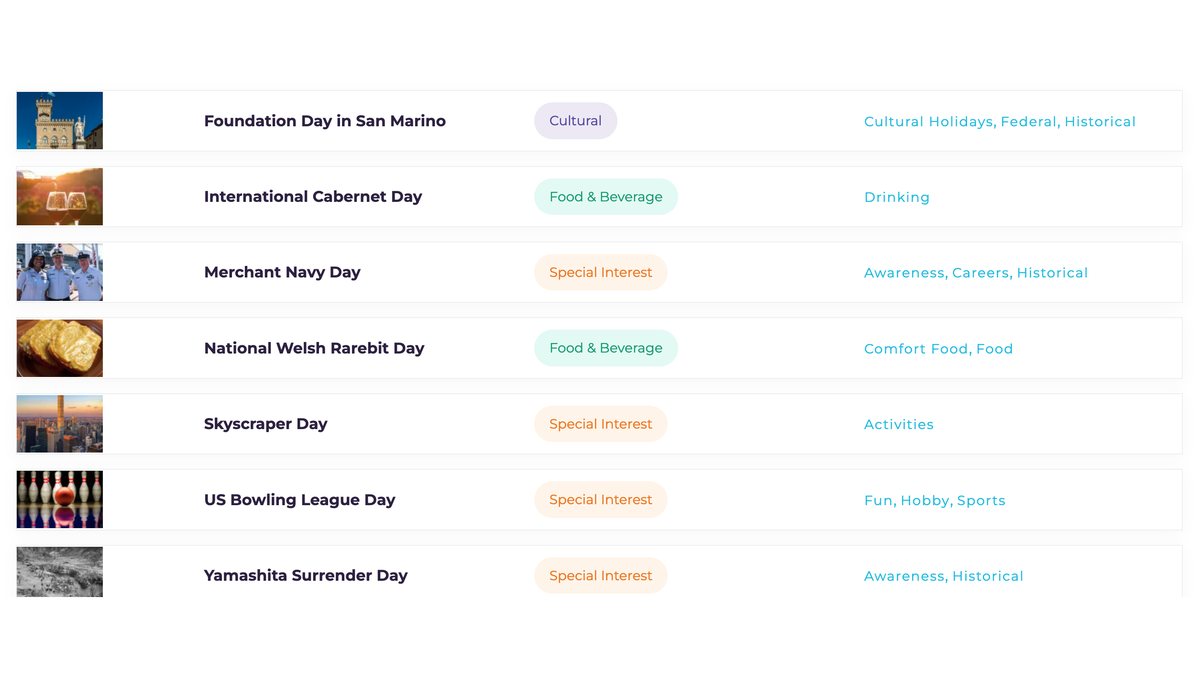
A day's holiday list on National Today
One ordinary day’s list. Scanning it takes under a minute, and most of the entries are gone before you finish reading the title. National Today, Sept 2026.

Run down a real day and watch how fast it sorts:

  • International Cabernet Day — images arrive immediately. Keep.
  • Skyscraper Day — obviously someone climbing. Keep.
  • US Bowling League Day — a lane, pins, a rented shoe. Keep.
  • College Colors Day — nothing arrives. It doesn’t do anything for the imagination. Skip.
  • Yamashita Surrender Day — a real historical event with real dead people in it. Skip, on judgment.
Two rejections that look alike and aren’t. One is no picture arrived — that’s a creative dead end and you move on without a second thought. The other is this is a real event and it deserves better than a joke — that’s a judgment call, and it is the more important of the two. Some occasions get handled sincerely or get skipped. There is another holiday tomorrow.

Do not force the ones that don’t arrive. If you find yourself reasoning your way toward an image, the image isn’t there. Three or four keepers out of a day’s list is normal and plenty.

Two entry points, and the scan tells you which

Sometimes a holiday hands you a phrase. Sometimes it hands you a picture. They are not the same job and pretending otherwise is why people get stuck.

  • Line-first. The occasion suggests words. Cabernet Day and a horse at a bar hands you “Why the long face?” before any image exists. Write the line, then build the frame that lets it land. This is the default and it’s what the standing prompt above is built for.
  • Image-first. The occasion suggests a picture and the picture is already funny. Skyscraper Day hands you a man climbing a building as though it were a normal commute. Here the goal is one image that is funny by itself — the line is icing on the cake.
Which one you’re in is decided back in stage one. When you scanned the list and something arrived, notice what arrived. Words or a picture? That answers which door you walk through, and it takes no extra time because you already did it.

The step between the idea and the prompt

You rarely go straight from “that’s the one” to a finished image prompt. There’s a conversational pass in between where you bring a half-formed picture and ask for it to be fleshed out.

The half-formed part matters. You are not asking for an idea from nothing — you are handing over a rough one and asking for it to be built out and beaten. Describe it messily, in whatever order it arrives, and include the bit you can’t quite make work.

THE FLESHING-OUT PASS — bring a rough picture, not a blank "It's time for a funny image for [OCCASION]. One image that's funny in itself — the punchline is icing on the cake. Here's a rough idea I haven't fleshed out. I imagine [HERO] [doing the absurd thing as though it were routine]. Around them, [the normal world, carrying on]. Maybe [the one small detail you noticed]. That's just an example, but you get the idea. Flesh this out and give me some others along these lines — or if you have something funnier, don't hold back." Photoreal cinematic. Not comics, not cartoons, not illustration.

Two things in that template do the work. “That’s just an example, but you get the idea” gives permission to depart from your version. “If you have something funnier, don’t hold back” asks it to try to beat you. Without that second line you tend to get your own idea handed back politely.

The New Yorker distinction, and it’s a real one. Describing the format as a New Yorker-style one-panel is a perfectly good way to talk to the writing AI — it knows exactly what you mean: one frame, ironic, deadpan, no setup. But that phrase must never appear in the image prompt. An image generator hears it as a drawing instruction and hands you ink cartoons. Use it to describe the shape of the joke; strip it before anything goes to a generator. Say “realistic cinematic” there instead.

Turning the concept into a prompt

You have the picture in your head. Now ask for it to be written properly. Say what you see, name the reference that gives it a feeling, and — this matters — ask for the setup frame, not the punchline frame.

THE PROMPT REQUEST "Help me create a detailed cinematic prompt that shows [HERO] [doing the thing]. And of course [the other character], [what they're doing about it]. I imagine [the specific staging detail you can see]. I imagine [the location]. Let's be inspired here by [REFERENCE]. He's of course not saying his line yet — let's create the image for the SETUP, where [the other character] is going to say '[the line].'" The line goes in the request so the frame is built to hold it. The line does not get spoken in the image.
Reference names are for the conversation, never for the prompt. Saying “inspired by Norman Rockwell” tells the writing AI exactly what warmth and staging you want, and a good one will hand back the prompt with a warning not to put that name in it — because an image generator hears an artist’s name as a style instruction and gives you a painting. Same trap as “New Yorker.” Use the reference to set the feeling; strip it before it reaches a generator.

Stage two — make the AI generate volume

Three lines is not a shortlist. It’s a guess.

The mistake almost everyone makes is asking for the answer. Ask for the raw material instead, and ask for far more of it than you intend to use. The prompt below is a standing one — the same every day, with only the occasion changing.

Four things in it do most of the work:

  • Titles first. Before any line gets written, ask for five to seven comic role titles for the absurd party, drawn from your business’s own vocabulary — The Top Dog, General Muttager, Director of Pawformance, Chief Fetching Officer. That list is an engine, not output. Most of the lines fall out of it.
  • Twelve lines minimum, with the posture varied — deferential, exasperated, conspiratorial, resigned, over-formal, defeated. Same situation, different relationship to it. The posture is what produces genuinely different jokes rather than twelve rewrites of one.
  • A two-hander option. One short exchange where the absurd party answers with silence and the star responds to the silence. Silence is a punchline the image can act.
  • Show the rest. The unpicked lines aren’t waste — they become post copy, comment replies, and future posts.
On puns. Allowed only when the wordplay is the collision — when it names a real procedure at your business through the absurd party’s nature. “Pawformance review” is a real HR ritual seen through a dog; it earns its place. A pun that only makes a sound does not. The test: does it name something that actually happens at this business?

The pre-flight, run on every line before it survives

PRE-FLIGHT — one line of result for each 1. SWAP TEST Replace the absurd element with a normal one. THE LINE MUST DIE. If it survives, the joke was in the picture, not the writing. 2. OCCASION TEST Replace the holiday with a different one. THE LINE MUST DIE. Ask what the occasion gives the absurd party a REASON to do. 3. DATE CHECK Verify the occasion's real date. Flag it if it isn't today. 4. PHYSICAL FACTS Every subject has eyes, mouth, body and hands specified, and the eyeline is stated. No mood adjectives. 5. NO-INVENTION No unsourced business detail, no asserted actor attributes, no logos. 6. BRAND TAG The exact literal tag. Not a guess at it. If a line fails a test, REPLACE IT. Never ship a line with a disclaimer explaining why it's flawed.

The shot — physical facts only

A generator’s default is the most common photo of that scene, and adjectives don’t override it.

Never write mood words. For every person and animal in frame, write where the eyes point (and “not looking at the camera” when they shouldn’t be), the body orientation, and what the hands are doing with an endpoint.

THE SHOT — rules that go in every image prompt MOUTH CLOSED, LIPS TOGETHER, NO SMILE — every character, always, including the one who speaks. You do not decide who talks until the animation pass, and an open mouth in the still locks you in. EYELINE AS ITS OWN SENTENCE "The two are facing each other across the desk. Their eyelines meet." Two subjects in a frame is not two subjects in a scene. PARTICIPANT, NOT SPECIMEN Pose the absurd party squared to whoever is addressing it. An animal shown broadside reads as a specimen. NO TEXT ON ANY SURFACE Including exterior signage, glass, screens, reflections, and anything visible through a window. No logos of any kind — leave walls blank. Real logos get composited in post. NEVER ASSERT WHAT THE ACTOR SUPPLIES No age, build, hair or features. Wardrobe and posture only. PHOTOREAL ALWAYS. Never write "New Yorker style" — it produces cartoons, which is the opposite of what that phrase means to a human.
The mouth rule appears twice in this guide for two different reasons. In Chapter 4 it’s about the training set — open mouths teach the model a permanent habit. Here it’s about the still: an open mouth in the image commits you to who speaks before you’ve decided. Same instruction, unrelated causes, both expensive.

Ask for the whole package in one pass

Staging this across turns wastes your morning. One request, one complete return: pre-flight results, the titles list, twelve-plus numbered lines with the pick defended, the two-hander, the image prompt, the post copy, the animation prompt with its negative prompt and break script and beat map, and any local angles last with sources cited.

Stage three — the part nobody tells you

The AI’s job is volume. The pick is yours, and it is usually a hybrid.

Here is what actually happens, and it is worth being honest about because every tool vendor implies otherwise. The results are sometimes helpful. More often, one option has something you like and a different option has something else appealing, and you assemble a third thing out of the two — something you hadn’t thought of and the AI hadn’t suggested.

That’s not the system failing. That is the system working exactly as intended. It’s a brainstorming partner, and brainstorming has always worked this way: the value is in what the volume jogs loose, not in any single suggestion. Suddenly the funniest pick of the day is obvious and there’s no contest with the others.

Which is why you ask for twelve and not three. You are not shopping a list. You are generating enough surface area that your own idea has something to catch on.
04

Your Consistent Character

Owner, spokesperson, or mascot. Training, trigger words, reference discipline — and the consent conversation.

Video 8:14
A consistent character, working. The same trained face, in a scene built around a title pulled from the business’s own vocabulary — the titles-first trick from Chapter 3, cashed in.

Fifty-two videos with one face is a brand. Fifty-two videos with fifty-two faces is noise that happens to be well-lit.

This is the single largest gap between what the AI video tools sell and what a business actually needs. Every vendor will hand you a stock avatar. A stock avatar is a stranger. Your customer needs to see your face, or your spokesperson’s, or your mascot’s — the same one, every time, until it’s familiar enough to be trusted.

Three kinds of consistent character, all valid

  • The owner. Strongest trust, hardest to sustain if you hate being on camera.
  • The spokesperson. An employee who’s good on camera. Works well; carries a risk if they leave.
  • The mascot. Badly underserved and often the best answer. A character can’t quit, can’t age, and can do things a person can’t.

How many photos, and which ones
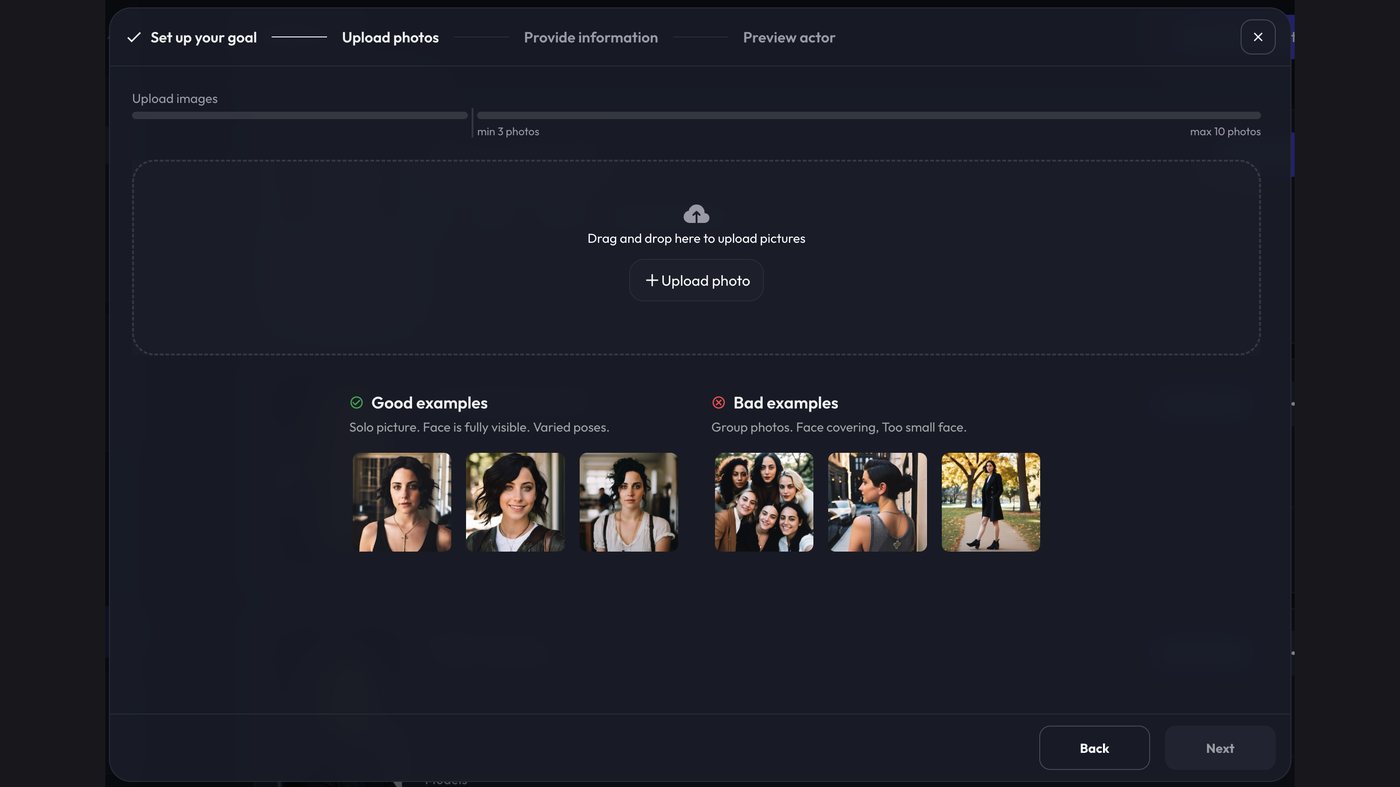
ArtFlow Actor Studio: the upload step, with photo limits and good/bad examples
The Actor Studio upload step, all of it. Three photos minimum, ten maximum — and ArtFlow’s own guidance underneath: solo, face fully visible, varied poses; no group photos, nothing covering the face, face not too small. All correct, as far as it goes. What it doesn’t tell you is the mouth rule below, which does more damage than those three combined. ArtFlow Actor Studio, Sept 2026.

The training set is not a portfolio. It is an instruction.

Ten photographs is not enough room to be sentimental about which ones you like. Every frame you upload is a vote, and the model counts votes. Pick the ones that teach it something, and leave out the ones that teach it a habit.

The mouth rule — the one that costs people months. Do not upload a photo where the mouth is open, mid-word, or making an O shape. Not one. If you feed it frames of someone talking, ArtFlow learns that this person’s face is a face with an open mouth, and from then on it hands you open-mouthed output forever, in every scene, whether or not the character is speaking. Neutral or slightly smiling, mouth closed, is the default state you are teaching.

Grabs pulled from video are where this goes wrong most often. A frame from a talking-head clip looks fine to you and is almost always mid-syllable.

The ten-photo set

THE SET — 10 slots, spend them like this 5 × Front, neutral to slight smile, well lit, MOUTH CLOSED 1 × Three-quarter, about 45° 1 × Profile 1 × Rembrandt — well lit, shadow across one side of the face 1 × Laughing 1 × Spare: a second front, or a wardrobe change WELL LIT THROUGHOUT. The Rembrandt frame is the one deliberate exception, and it's there to teach the model that this face still reads with shadow on it — not to make the set moodier. NEVER ✗ mouth open, mid-word, or an "O" shape ← the expensive one ✗ grabs pulled from talking-head video ✗ group photos ✗ anything covering the face ✗ the face too small in frame

The laughing frame is the exception that proves the mouth rule, and it earns its slot: one genuine laugh teaches the model the range of the face without teaching it a resting state. One. Not three.

Then: the rules for using it

  • Trigger word chosen so it can’t collide with ordinary English.
  • One named subject per prompt. Always.
  • Refer to everyone else generically — “the woman,” “a man in an apron.” The moment you name a second person, the generator starts swapping faces.
  • Waist-up medium shots as the default. Footwear is where hands-and-feet failures go to live; frame it out.
  • Logo present but subordinate. Background, not billboard.
Trigger word one token, can't collide with ordinary English Subject rule exactly one named subject per prompt Others generic only — "the woman", "a man in an apron" Framing waist-up medium, footwear excluded Logo background, subordinate
Consent isn’t optional. This only works with someone who has agreed to it in plain terms and understands what it means. Get it in writing. Say so out loud on camera when you teach it.
05

Blending the Character Into the Scene

Where most people's output falls apart. Prompt order, matching light, and the reroll economy.

Video 5:40
The character carrying a scene he isn’t the joke in. National Dog Day — and the post underneath named five real New Braunfels businesses, from the humane society to the brewery. Rung three, five times over.

The generator weights early tokens harder. You want the face to win every conflict.

  • Order of operations. Character reference first, then the scene, then the light. Not the reverse.
  • Match the light or the head floats. If the scene is warm interior tungsten and your reference is daylight, you get a face pasted onto a room. Describe the light once, plainly, and let it apply to both.
  • Don't re-describe the face. Every adjective about the character's appearance competes with the trained reference. Name the character, describe what they're doing, and stop.
The reroll economy. Two habits cut spend more than anything else: get the composition right in the still before you ever animate, and change exactly one variable per reroll. Changing three and getting a better result teaches you nothing.

Where it physically goes

Straight into the generator’s prompt box, with the actor invoked inline as the first token — not picked from a dropdown afterward.
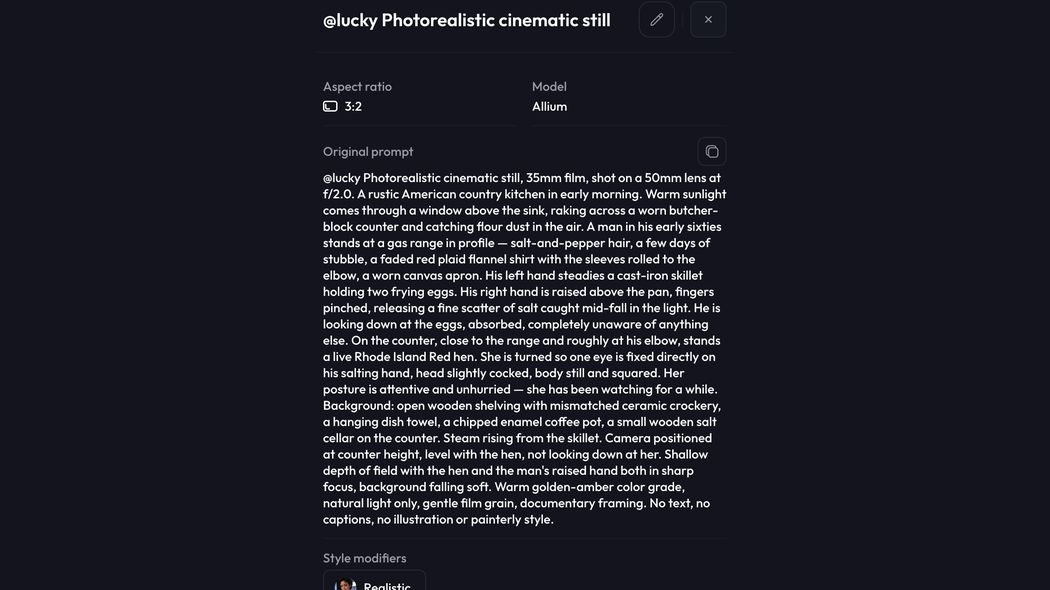
A finished ArtFlow prompt with the actor token first
The actor token leads. Everything after it is scene. ArtFlow, Sept 2026.

The anatomy of a working image prompt

Every good one has the same eight parts in the same order. This is the one from the reel above, taken apart:
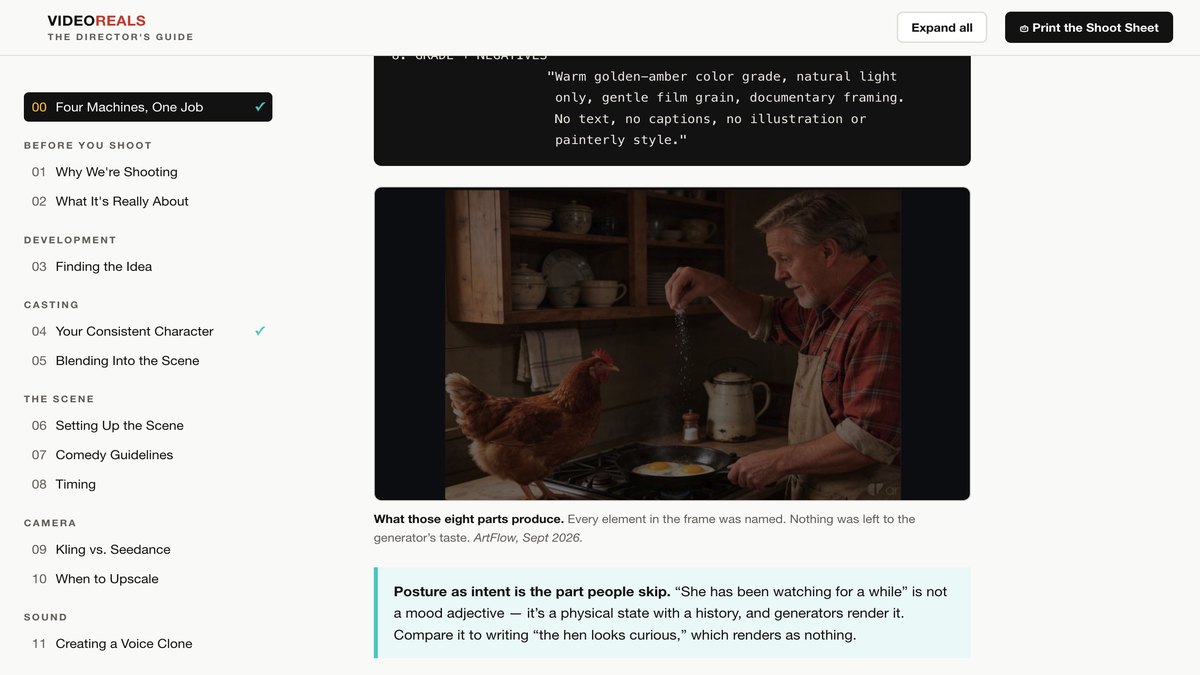
THE EIGHT PARTS, IN THIS ORDER 1. ACTOR TOKEN @actor — first, always 2. FORMAT "Photorealistic cinematic still, 35mm film, shot on a 50mm lens at f/2.0" 3. PLACE + TIME "A rustic American country kitchen in early morning" 4. LIGHT "Warm sunlight through a window above the sink, raking across a worn butcher-block counter and catching flour dust in the air" 5. SUBJECTS Position, wardrobe, and what each hand is doing WITH AN ENDPOINT. Then the eyeline as its own statement. Then posture as intent: "attentive and unhurried — she has been watching for a while" 6. BACKGROUND A short list of specific objects. Named things, not "cluttered" or "homey" 7. CAMERA Height, level, depth of field: "positioned at counter height, level with the hen, not looking down at her. Shallow depth of field with the hen and the raised hand both in sharp focus, background falling soft" 8. GRADE + NEGATIVES "Warm golden-amber color grade, natural light only, gentle film grain, documentary framing. No text, no captions, no illustration or painterly style."
The generated still from that prompt
What those eight parts produce. Every element in the frame was named. Nothing was left to the generator’s taste. ArtFlow, Sept 2026.
And here is what that still became. “You didn’t preheat. But go on.” Same frame, animated — the eight parts above are what made it animatable without drifting.
Posture as intent is the part people skip. “She has been watching for a while” is not a mood adjective — it’s a physical state with a history, and generators render it. Compare it to writing “the hen looks curious,” which renders as nothing.

Scale the detail to the joke. A comedy two-shot where the staging is the setup needs every one of those eight parts. A wide establishing shot that just has to look right can run much shorter. Don’t write four hundred words for a frame that isn’t carrying a punchline.

Negatives worth keeping standard

STANDING NEGATIVES — paste on every prompt No text, letters, numbers, signage, insignia, or writing anywhere in the image. No captions. No logos. No illustration or painterly style. Add per scene as needed: No visible weapons. Mouth closed, lips together, no smile. Jaw set. Looking to screen-left, NOT at the camera.
Set 16:9 before you generate, not after. The default is often 3:2, and a 3:2 frame means a trip to Photoshop and a generative-expand pass to get your edges back — every time. It costs nothing to set it first and it costs a step every single time you forget.

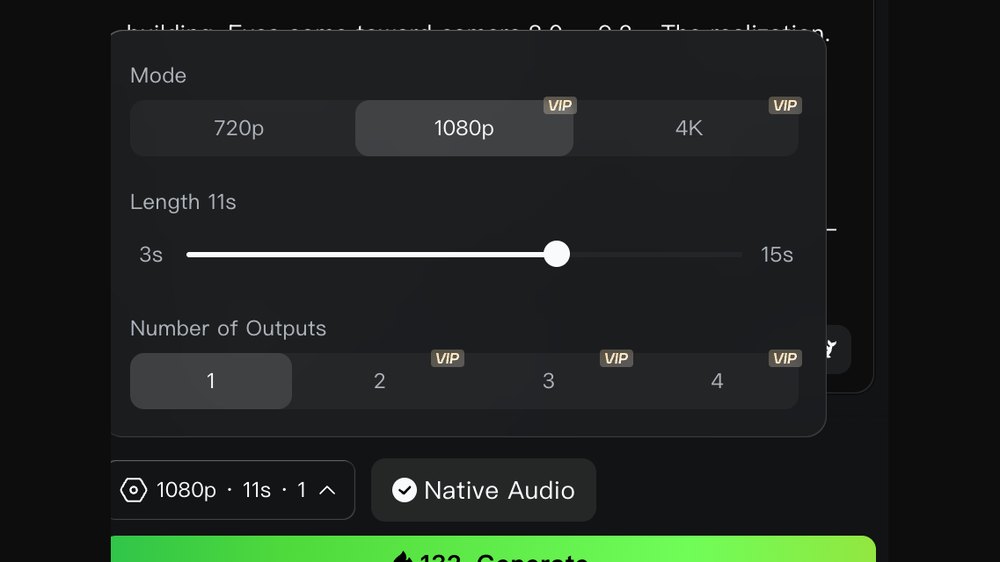
One output. Not two, not four.

Kling generation settings: 1080p, 11 seconds, one output, 132 credits
Number of Outputs: 1. The tempting button is the one that gives you four to choose from. Kling, Sept 2026 — 1080p, 11s, one output, 132 credits.

Multiple outputs look like insurance and they are the opposite. The generator is good enough now that the first run is usually right, and when it is wrong it is usually wrong because of your prompt — which means every extra output is another copy of the same mistake at full price.

The chicken reel is the proof. The first generation put the punchline in the man’s mouth instead of the chicken’s. Had I asked for two outputs, I’d have paid double for two videos of a man talking. Instead: one output, read it, fix the prompt, rerun. Reroll on a corrected prompt, never on the same one.

Before it goes to the animator — and two things not to do

The still is nearly finished the moment you like it. Almost everything people do to it here makes the video worse.

Do not upscale before animating. The instinct is obvious — sharper input, sharper video. What actually happens is that a 2× upscale often comes back too large for the video generator to accept, and you end up screenshotting your own upscaled image to get it back down. You paid credits and time to arrive back where you started. Upscaling happens after the video exists, never before.

There is a real resolution floor. Hand the animator something soft and you get soft video — the detail can’t appear from nowhere. But it’s a floor, not a slider. Past a certain point you get diminishing returns, and past a further point you get a file the generator refuses. Generate at a sensible size and stop thinking about it.

Do not add grain before animating. This one is more seductive because the reasoning is half right: grain does knock the perfect-skin sheen off an AI image and it does read as more cinematic. But you have just handed a grainy image to a system whose whole job is enhancement. It enhances your grain. What arrives is a video where the texture you added has been amplified into noise. Grain is a finishing move. It goes on in post, at the end, where you control it.

The one thing worth doing

Fix genuine artifacts, and nothing else. You will sometimes get an otherwise perfect frame with something wrong at the edge — a foot doing something anatomically impossible, a stray figure the generator invented in the background, a hand with an extra finger.

  • Open it in Photoshop, select the offending region, and remove it with generative fill.
  • Fix the aspect ratio here too if you forgot to set 16:9 — select the empty edges and generate, rather than enlarging and cropping. Enlarging costs you the composition; extending keeps it.
  • Quick Export as PNG.
  • Load into the animator.
The test for whether to touch it at all: would a viewer notice this in a ten-second reel they’re watching once, at arm’s length, on a phone? A malformed hand at the edge of frame, yes. A slightly odd reflection, no. Everything you fix that nobody would have seen is time you spent to make an identical video.

What actually causes a reroll — and how that has changed

Worth being honest about the history, because it tells you where to spend your effort.

  • Artifacts — the stray arm, the impossible foot, the invented bystander. This used to be common. It happens less and less as the models improve, and it will keep declining. Do not build your process around it.
  • Timing — for a long time this was the number one reason. The line landed in the wrong place, the pause wasn’t there, the cut came early. It is now rarely the reason, and the fix wasn’t better rerolling. It was specifying the timing up front.

Most rerolls are a specification failure, not a generator failure.

That’s the whole lesson of this section. Every reroll you run is the generator filling in something you left blank, and the cheapest fix by an enormous margin is to leave fewer blanks. A longer, more specific first prompt costs you two minutes of typing. A reroll costs credits and five minutes of waiting, and often produces a different blank being filled differently.

When you do reroll, change exactly one variable — and reroll on a corrected prompt, never the same one. Changing three things and getting a better result teaches you nothing about which one mattered.
06

Setting Up the Scene

One scene, two, or more — and what each actually costs you in continuity and credits.

Video
A sincere occasion, handled sincerely. Know when to hold them — and know when the right move is warmth rather than a punchline. Chapter 1’s judgment call, made the other way.

If the idea works in one scene, do it in one scene.

  • One scene. The default and usually right. A single frame, a single line. The image holds the setup and the line delivers the whole thing. Nothing to cut, nothing to sync, nothing to go wrong.
  • Two scenes. When the joke needs a before and an after — a state that changes. Not when you just want more footage. Two scenes cost more than twice as much as one, because now you have continuity to protect.
  • Three or more. Reserve for the rare idea that's genuinely a story with a middle. Most of the time this is ambition, not necessity, and it's where a forty-minute build turns into a two-hour build.
MULTI-SHOT Shot 2 begins: "Clean cut to ..." ← stops the generator morphing one scene into the other Custom Multi-Shot divides the duration across shots rather than doubling the cost. Know which mode you're in before you generate. CONTINUITY CHECKLIST BETWEEN SHOTS □ same wardrobe □ same light direction □ same props, same hands □ same room The generator will change one of these for fun if you let it.

When it really is a story with a middle

Occasionally an idea earns more than two shots. When it does, name every beat before you write a word of prompt. Named beats make the structure legible — to you, and to whatever is helping you write it.
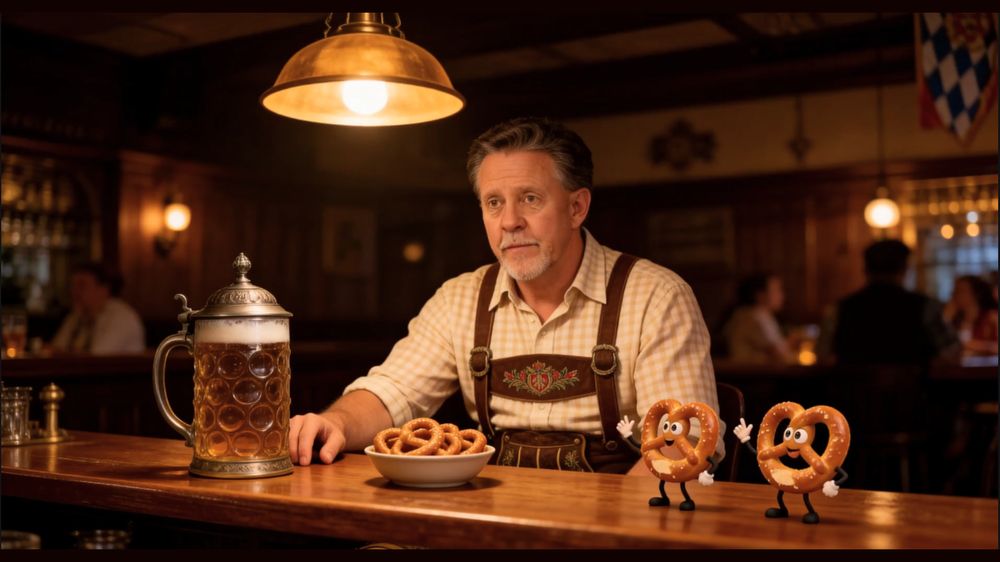
A generated bar scene with two animated pretzels
A six-shot build. Every shot below has a name before it has a prompt. Kling, Sept 2026.
NAMED BEATS — a real six-shot structure SHOT 1 THE SETUP The absurd parties, delighted with themselves. The closing insult lands. SHOT 2 THE VOID Cut to the hero. Forward stare. Dead eyes. HOLD THIS. Hold it past the point of comfort. One... two... Ambience keeps running. He does not blink. SHOT 3 THE HAND Still no eye contact. A hand rises with the unhurried calm of a man reaching for his car keys. SHOT 4 THE SELECTION It closes around one of them — MID-SENTENCE. Two little legs kick once. Dignity, briefly. SHOT 5 THE CRUNCH Never looks at him. Never changes expression. CRUNCH. CUT TO BLACK ON THE CRUNCH. Not after. On it. SHOT 6 THE BUTTON Two beats of black. Snap back for half a second: the survivor, frozen. A quiet, hollow little voice. Then clean black.

Three things in that structure are transferable

  • The hold past comfort. Shot 2 does nothing for an uncomfortably long time, and the discomfort is the joke. The trick that makes it read as deliberate rather than broken: keep the ambience running. A stein clinks somewhere. Silence with room tone is a choice; silence with nothing in it is a bug.
  • Interrupt mid-word. Shot 4 catches the victim starting a fresh compliment — “Your posture’s really improv—”. Cutting a line off is funnier than letting it finish, every time, because the audience completes it themselves.
  • Cut ON the sound, not after it. Same family as cutting on the reaction rather than the line. The crunch lands and you are already in black. The audience feels it in their teeth.
End on clean black — no text, no card. Hold it a beat longer than feels necessary. That black is your plate: it’s where the title goes in post, and if you didn’t leave it, you’ll be trimming the joke to make room for your own logo.
07

Comedy Guidelines

Straight face, one image, one line. The rules in the order they get broken.

Video 6:30
“I’m not getting older — I’m becoming a certified pre-owned classic.” The pun names a real procedure at this business, which is the only test a pun has to pass.

It works because the character doesn't know it's funny.

The rules, in order of how often they get broken

  • Write the line first. Always. Build the image around the line, never the line around a picture you happen to like.
  • Run the swap test. Take out the absurd element and put in a normal one. If the line still works, the line is dead — the joke was in the picture, not the writing. Write another.
  • The absurdity enters as paperwork, not as observation. Your character does not remark on the strange thing. They administrate it. “Forty-one done” is funny. “Can you believe I'm whittling matches?” is not.
  • Never wink. Never explain. No knowing look at the camera, no tag line that clarifies the joke. The second you signal that you know it's funny, it stops being funny.
  • The last word is the punchline. Rewrite until the payload lands on the final syllable. Anything after it is throat-clearing and it kills the timing.
  • Photoreal, always. Never illustration, never cartoon, never ink. And never put “New Yorker style” in an image prompt — it produces ink drawings, which is the opposite of what that phrase means to a human.
Editorial boundaries — non-negotiable. Jokes point at the process, the operator, or the spokesperson. Never at the customer's financial situation. Never at a real defendant, a real case, or a real person's misfortune. Every business has a version of this line. Find yours before you need it, not after.

Borrow the trope, never the property

A large share of the best occasions are cultural — Star Trek Day, May the Fourth, and so on. These are gifts, and they come with an obvious trap that is easy to walk around.

The trope is public. The property is not.

You do not need Captain Kirk. You need the red shirt — the decades-old joke that the guy in the red uniform is the one who doesn’t come back. That joke belongs to the culture. Your hero standing on a desolate planet in a red uniform, looking hopeless: “I knew I should have grabbed the blue one, even though it was wrinkled.”

No character is depicted. No logo appears. No name is used. And the joke is better for it, because the trope is the part the audience actually shares — the specific character would only have narrowed it.

The test: could you describe this frame to someone without naming the property, and would they still get it? If yes, you have a trope. If you need the name for it to land, you have someone else’s asset and you should find a different angle.
08

Timing

The difference between a line that lands and the same line that dies — and it's cheaper upstream.

Video 4:48
“My ten o’clock wants something with good resale and a short walk to the door.” Administrated, never observed. Nobody in the frame remarks on the crab.

Timing is the thing people assume they’ll fix in the edit. It is much cheaper to get right upstream.

The shape of a reel

Almost every one of these has the same four movements, and knowing them is what lets you write to a fixed duration instead of hoping.

  • The buildup. Something happens, or nothing happens on purpose. Either way the scene needs a moment to be absorbed before anyone speaks.
  • The absorb. A beat where the viewer takes in the frame. This is the one people cut, and cutting it is why their reels feel rushed.
  • The delivery. The line.
  • The expression. A small change of face — sometimes before the line, sometimes after. Mild. It is not a reaction shot; it’s a flicker.
The pause that matters most comes after the punchline. Not before it. You need breathing room on the other side of the line — time for the audience to laugh. Cut on the last syllable and you have stepped on your own joke. This is the single most common timing mistake and it is free to fix.

How long

Kling will let you go to fifteen seconds. Don’t. Ten or eleven is the working range, twelve is the ceiling, and past that you are asking too much of an audience that is scrolling. The constraint isn’t the generator. It’s attention.

Writing the beats out

Don’t describe the timing. Number it. A prompt written as a timeline gets you the pauses; a prompt written as a paragraph gets you a character talking continuously for eleven seconds.
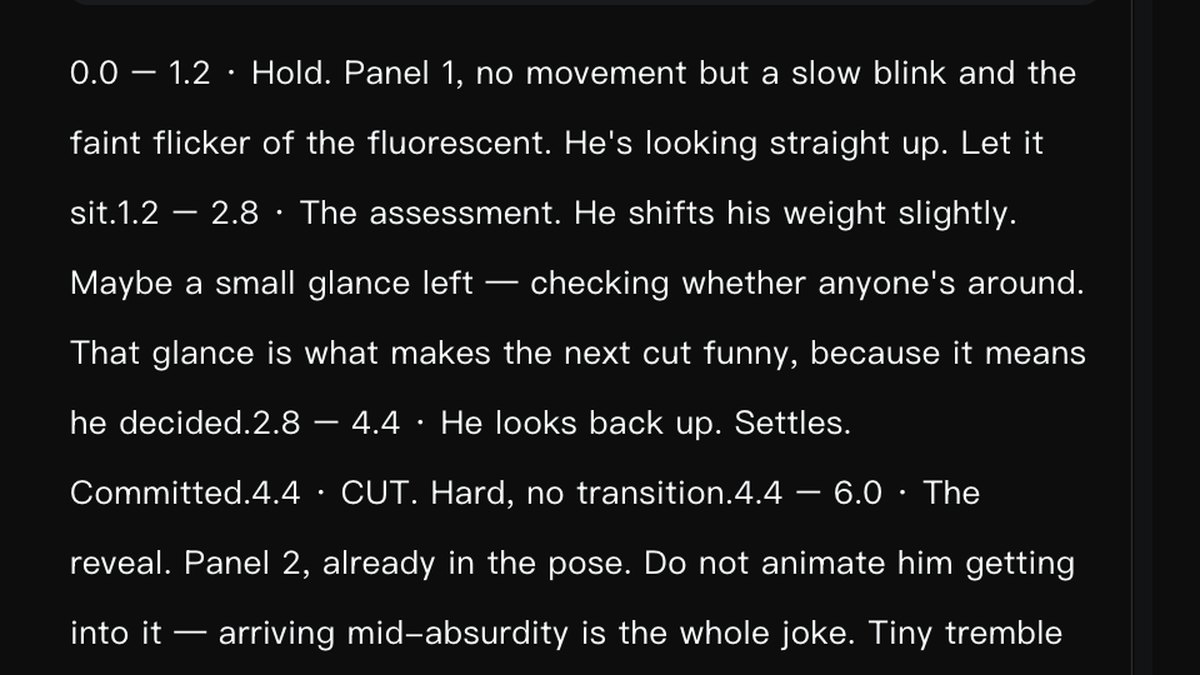
A Kling prompt written as a numbered timeline of beats
A real prompt, written as a timeline. Note what the beats carry besides motion: “That glance is what makes the next cut funny, because it means he decided” — the reason is in the prompt, not just the action. And “Do not animate him getting into it — arriving mid-absurdity is the whole joke.” Kling, Sept 2026.
THE BEAT SHEET — write it like this, not as a paragraph 0.0 — 1.2 Hold. Establish. No movement beyond a blink. 1.2 — 2.8 The buildup. One small deliberate action. 2.8 — 4.4 The absorb. Settle. Commit. 4.4 CUT. Hard, no transition. ← if there's a cut 4.4 — 6.0 The reveal. 6.0 — 8.0 Hold. Strain builds. 8.0 — 9.5 The line. 9.5 — 11.0 SILENCE. Do not cut here. ← the laugh Say WHY a beat exists, not just what moves. "That glance is what makes the next cut funny" tells the generator what to protect. "He glances left" does not.

A note on the voice track

Those voiceover timings are for you, not for a text-to-speech engine. The performance comes out of the video generator and the voice is swapped afterward (Chapter 11), so the pauses you write here are what you specify to the animator — not pause markup typed into a speech tool.

A quarter second is a beat. Half a second is a comic pause. A full second is a different joke. Choose the number; don’t discover it.

Include the spoken line verbatim, in quotes, in the generation prompt — even when ElevenLabs will replace the audio entirely. The generator uses it to shape the mouth, and lip-sync that roughly matches is worth far more than clean audio over a mouth doing something else. This holds for animal characters too.

Two tracks, not one

On anything with dialogue, write the picture and the voice as separate timelines. They are different instruments and they do not share a clock.

PICTURE TRACK 0.0 — 1.2 Hold. No movement but a slow blink. 1.2 — 2.8 The assessment. A small glance — checking. 2.8 — 4.4 Looks back. Settles. Committed. 4.4 CUT. Hard, no transition. 4.4 — 6.0 The reveal. Already in the pose. Do NOT animate him getting into it — arriving mid-absurdity is the joke. 6.0 — 8.0 He holds. Strain building. Eyes toward camera. 8.0 — 9.2 The realization. Not panic — arithmetic. 9.2 — 10.0 Freeze and out. VOICEOVER TRACK 0.9 — 2.4 "Last bag. Top shelf." 2.4 — 6.0 (silence through the cut — THIS IS LOAD-BEARING) 6.0 — 7.1 "[The occasion]." 7.1 — 8.1 (pause) 8.1 — 9.4 "I'll be here all month."
“Silence through the cut — this is load-bearing.” Write that note to yourself, in the prompt, every time. Silence is the easiest thing to accidentally fill and the most expensive thing to lose. Naming it as structural stops you trimming it later when the clip feels slow in the edit — which it always does, to the person who has watched it forty times.
“Do not animate him getting into it — arriving mid-absurdity is the whole joke.” Generators love to show you the transition. Most of the time the transition is the part that kills it: you want the audience to arrive at the absurd state already in progress, the same way a one-panel cartoon does. Say so explicitly or you’ll get the wind-up.

The golden prompt

Here is the technique that does more for the finished reel than any setting in this guide, and it costs nothing.

Ask the AI to put on its comedic-timing expertise and apply it to the scene.

Not “write me a prompt.” Not “make this funny.” Hand it the scene and the line you already wrote, and ask it to direct the timing. What comes back is the thing an experienced comedy editor would have told you: the chicken pauses for a beat, looks down at the skillet, looks back up at the man, then delivers the line. You would not have written that. It is the difference between a chicken saying words and a joke landing.

THE GOLDEN PROMPT "Put on your comedic timing expertise and apply it to this scene. Here is the image. Here is the line. Give me the beats with timestamps." Then paste the beats straight into the generator.

The button

Ask for the timing and you often get told something you didn’t know you needed. Here is a real return on a real scene — Nina and a horse at a bar, “Why the long face?”
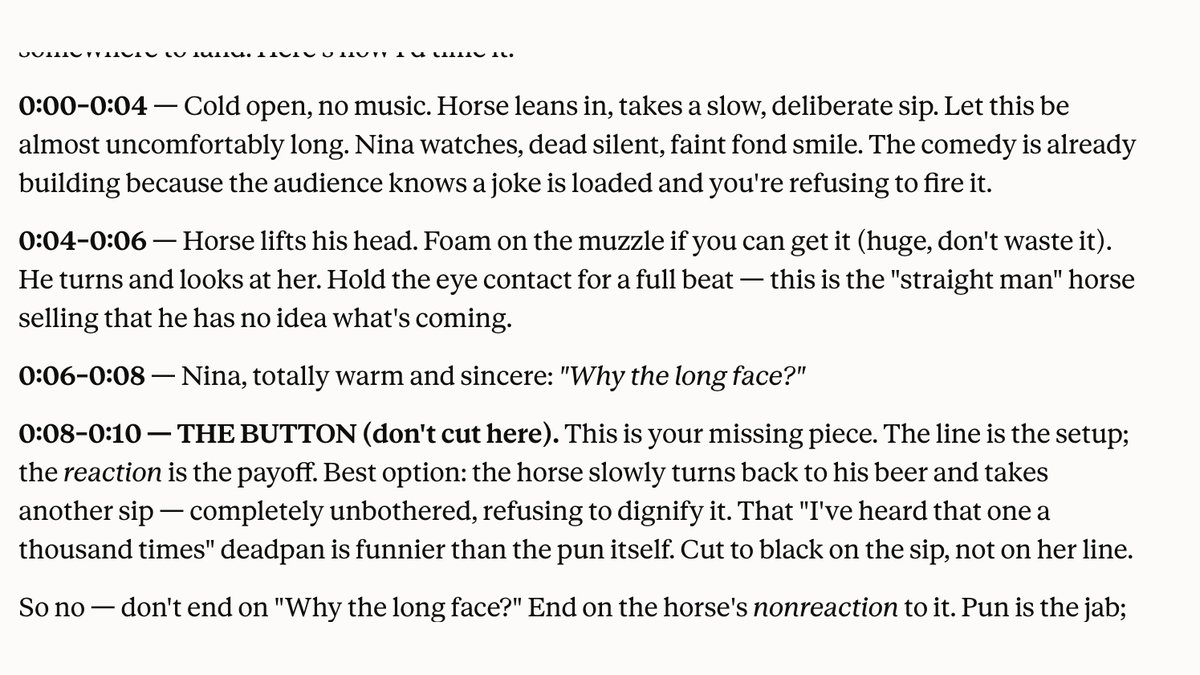
An AI-returned beat map ending in a comedic button
The golden prompt, answered. Note what it does with the ending — it refuses to stop where the writer wanted to stop. Sept 2026.

The diagnosis in that return is worth more than the beats: “you’re ending on the joke instead of after it. The laugh needs somewhere to land.” That’s the pause-after-the-punchline rule, arrived at from the other direction.

And the fix has a name. The button is the small reaction that comes after the line and actually carries the payoff. Here it’s the horse turning back to his beer and taking another sip — completely unbothered, refusing to dignify the pun. The line is the setup; the reaction is the punchline.

Pun is the jab. The deadpan is the knockout. Cut to black on the reaction, never on the line. If you take one thing from this chapter, take that.

This also explains why the mouth-closed rule in Chapter 3 pays off here: the character who doesn’t speak is doing the comedic work, and you want that decision still open when you reach the animation pass.

On which AI. These are not interchangeable and it is worth being blunt about it. Gemini is superb at image creation and it is not funny — there is a joke in there somewhere. Claude writes in a more human register and is genuinely, unexpectedly good at comedy, especially once you hand it the comedy parameters to work inside. That’s a tested preference from doing this daily, not a recommendation anybody paid for. Nobody here is sponsored by anybody.

09

Kling vs. Seedance vs. Happy Horse

A casting decision, not a ranking. Plus the three-part animation prompt that stops the generator reinventing your image.

Video 6:02
Two characters, one of them doing nothing. The bear sits still and unimpressed while the ranger does all the work — the stillness is authored, and it is where the joke lives.

Not a ranking. A casting decision.

  • Kling — the primary. Best at holding a face through motion and the most reliable at delivering a quoted spoken line for lip-sync. When the shot is your character talking, this is the shot.
  • Seedance — B-roll. Image-to-video at 720p, upscaled after. The cutaway, the establishing shot, the hands, the thing that isn't the face.
  • Happy Horse — the backup. When Kling is queued, degraded, or fighting you on a composition, this is where the shot goes rather than into a fourth reroll.
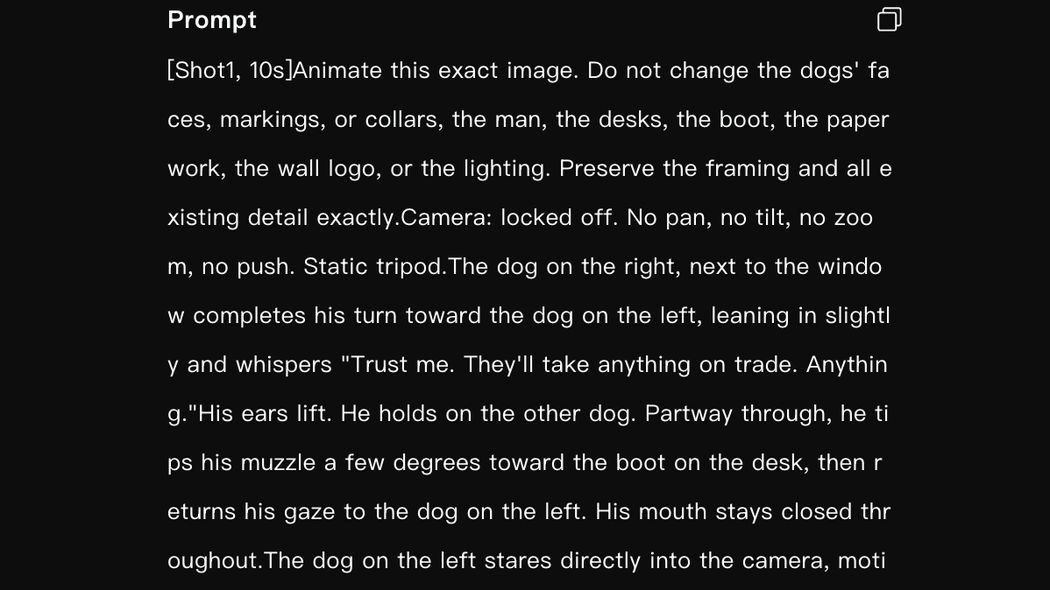
THE ANIMATION PROMPT — this order, every time 1. PRESERVATION "Animate this exact image. Do not change ..." 2. CAMERA slow push / slight drift / locked off 3. MOTION what moves inside the frame Do NOT re-describe the scene. You already made the image. Every adjective gives the generator permission to reinterpret it. Multi-shot: begin Shot 2 with "Clean cut to ..." to stop morphing. Dialogue: include the spoken line verbatim, in quotes — even when ElevenLabs will replace the audio. It shapes the mouth. Works on animals too.
A preservation-first animation prompt in Kling
Preservation first, and be specific about what must not move. Note it names the things by name — faces, markings, collars, the desks, the boot, the paperwork, the lighting — rather than saying “don’t change anything.” A list beats an instruction. Kling, Sept 2026.
Name the camera’s stillness explicitly. “Camera: locked off. No pan, no tilt, no zoom, no push. Static tripod.” Four negatives and a noun. Left unsaid, generators drift — and a drifting camera on a one-image joke reads as a mistake rather than a choice.
Upscale after, never before. See Chapter 5. Handing an upscaled still to the animator often produces a file it refuses outright, and grain added beforehand gets amplified rather than preserved. Both are finishing moves.

What a fully specified animation prompt looks like

Four patterns show up in every good one. They’re visible in the examples below.

1 · Preserve by name, not by instruction

Already covered above: list the things. Faces, clothing, the dog’s markings and vest, the truck, the house, the lighting. A list beats “don’t change anything.”

2 · Say what stays still

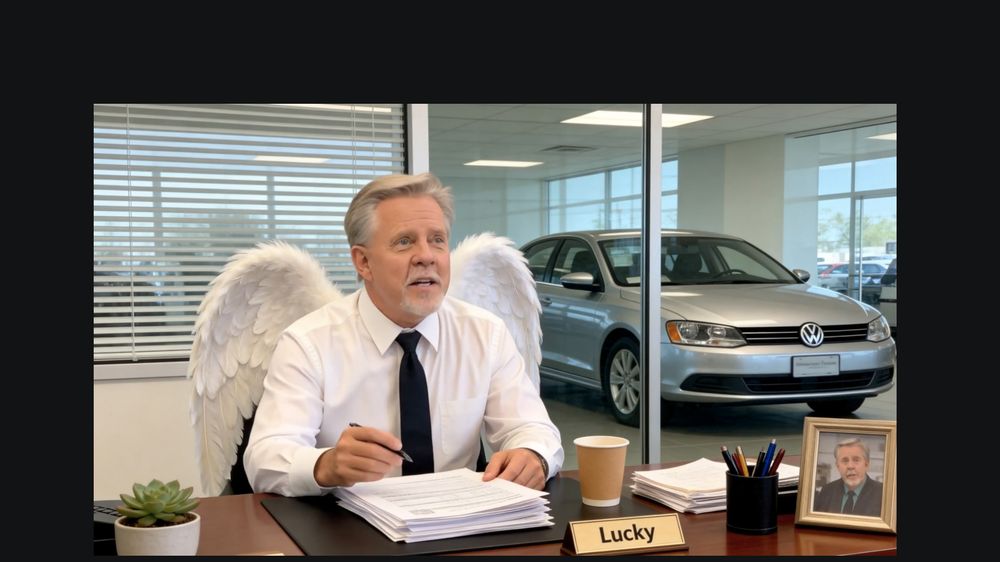
This is the one people miss. Every character needs an instruction, including the ones who aren’t doing anything. “His hands stay resting on the desk. His wings stay folded behind him.” “The dog sits facing forward, alert, chest still.” “No other motion.”

Left unsaid, a still character drifts — and drift reads as a glitch rather than a performance. Stillness has to be authored just as deliberately as movement.

3 · Anchor micro-actions to words, not to seconds
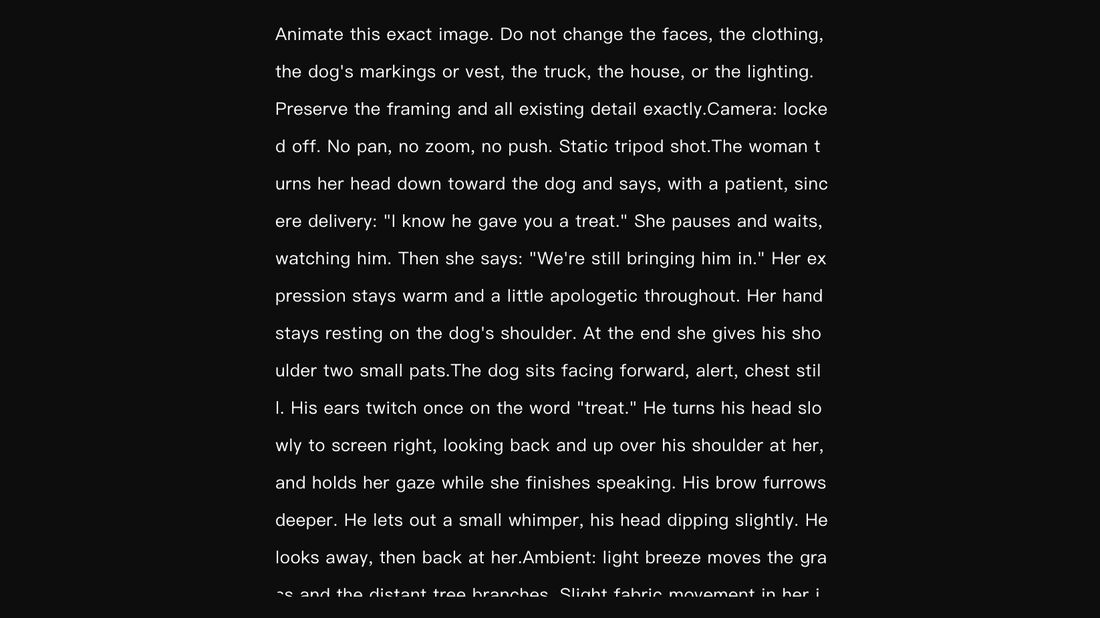
An animation prompt anchoring a micro-action to a spoken word
“His ears twitch once on the word ‘treat.’” Not “at 2.4 seconds.” The generator knows where the word is; tying the action to it survives any drift in the delivery. Kling, Sept 2026.

Use both: timestamps for structure, word-anchors for the small reactive beats that have to land on something.

4 · Name the ambient layer separately

“Light breeze moves the grass and the distant tree branches. Slight fabric movement in her jacket.” A locked-off shot with nothing moving in the background reads as a photograph with a talking head pasted on. Two clauses of ambient motion is the difference between a still that moves and a shot.

The two-shot
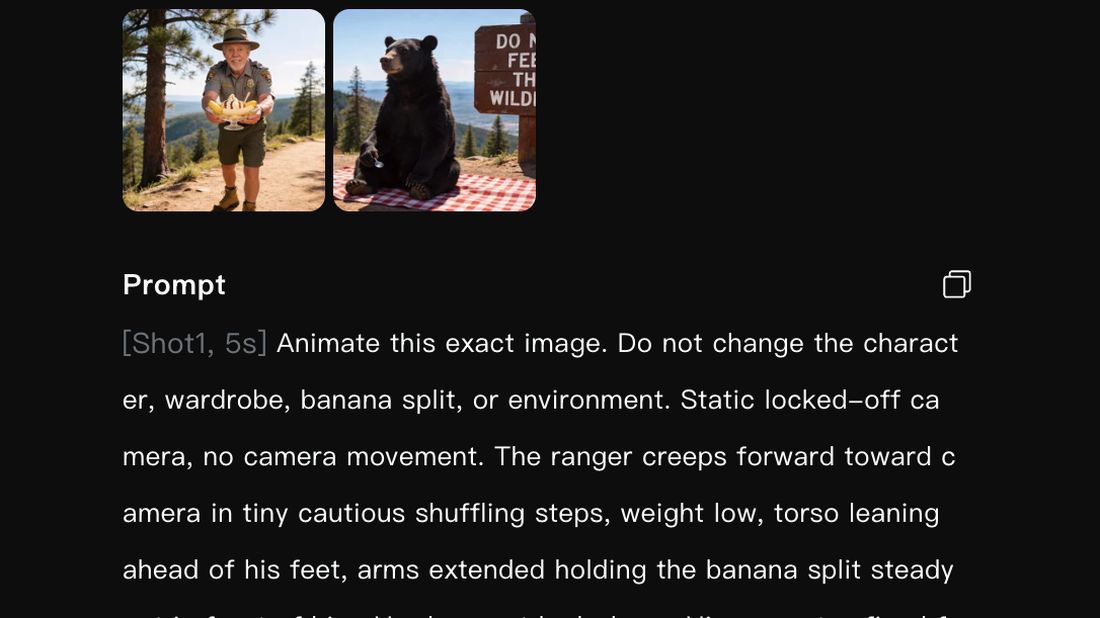
A two-shot animation prompt using a clean cut
Shot 2 is where the button lives. “Holds a flat unimpressed look for a moment, then turns back and continues waiting. No other motion.” That’s the reaction carrying the payoff, written as staging. Kling, Sept 2026.
A generated two-hander frame
The reverse angle is the cheapest two-hander there is — same desk, opposite side. Kling, Sept 2026.
THE FULL SHAPE [Shot1, Ns] Animate this exact image. Do not change [LIST THE THINGS BY NAME]. Preserve the framing and all existing detail exactly. Camera: locked off. No pan, no tilt, no zoom, no push. Static tripod shot. [SPEAKING CHARACTER] — the action, the delivery, the line verbatim in quotes, and what their hands/body do throughout. [SILENT CHARACTER] — explicitly still. "Hands stay resting on the desk." "Chest still." "No other motion." Plus one micro-action anchored to a word. Ambient: [two clauses — breeze, fabric, branches, steam] [Shot2, Ns] Clean cut to [the reverse angle / the other subject]. Static locked-off camera. [The reaction — this is the button.]
10

When to Upscale

And when it's a wasted step. The settings, and why the defaults are wrong.

No video

Upscaling is not a quality knob you turn to eleven. It's a fix for a specific problem, and applied to a clip that doesn't have that problem it makes things worse.

  • Upscale when: the clip came out of a 720p generator and it's going full-frame; there's fine detail (text, fabric, hands) that's mushy but structurally correct; the clip will be seen on something larger than a phone.
  • Don't upscale when: the clip is already clean at delivery resolution; the problem is structural rather than softness — no upscaler fixes a morphed hand, it gives you a sharper morphed hand; the clip is a fast cut nobody will look at for more than a second.

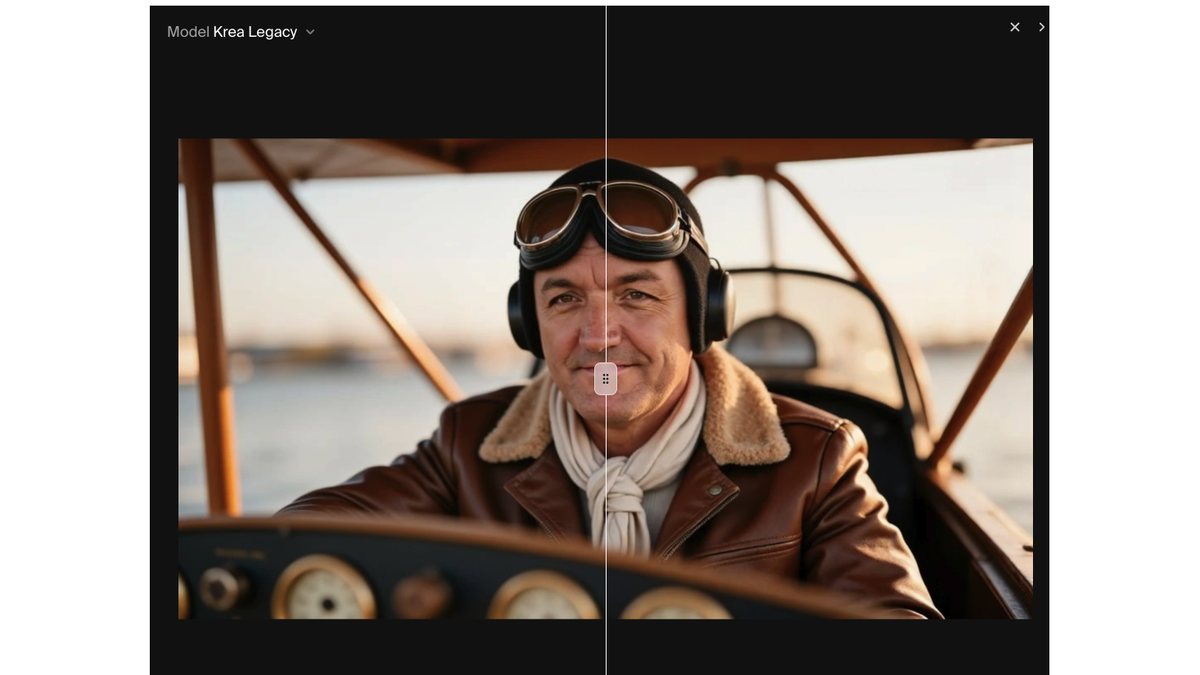
Krea Enhancer comparison slider, original left, enhanced right
The comparison slider is the tool, not a nicety. Original left, enhanced right, same frame. Judge the result here before you spend the credits, not after. Krea Enhancer, Sept 2026.
The same comparison at 800% on the eyes
Then zoom to 800% and look at the eyes. This is where an upscaler either recovers detail or invents a different person. Left is soft but honest; right is sharper and still the same face. That’s the pass. Krea Enhancer, Sept 2026.

The settings that keep the face

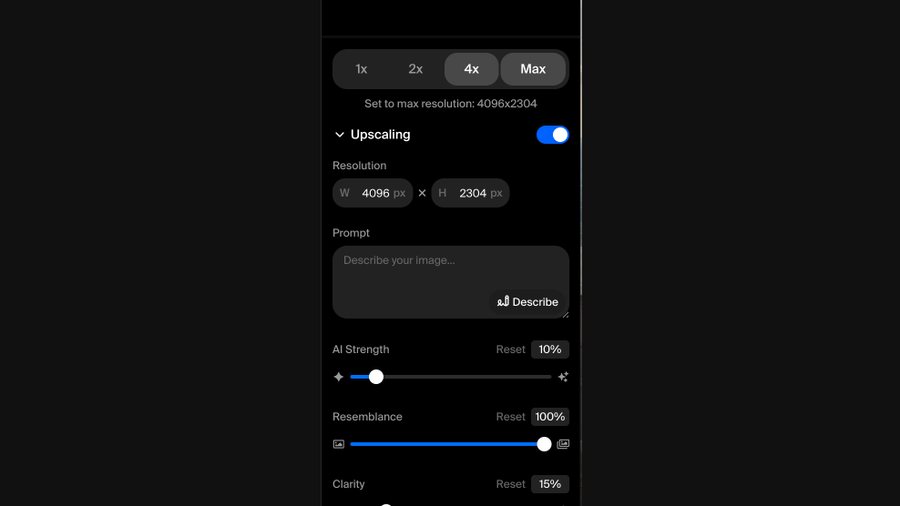
Krea Enhancer settings panel
Four controls do all the work, and three of them are turned down. Krea Enhancer, Sept 2026.
KREA ENHANCER — the values on screen above Model Krea Legacy Scale 4× (→ 4096 × 2304 from a 1080p source) AI Strength 10% ← LOW. This is the one that rewrites faces when you raise it. Resemblance 100% ← MAX. Hold the original. Clarity 15% ← LOW. Prompt empty ← leave it empty. A prompt here invites reinterpretation. The pattern is the whole lesson: strength down, resemblance up. You are asking for MORE PIXELS, not more opinion.
Every default in an upscaler is tuned for a photograph of nothing in particular. Your frame has a face in it that has to match fifty-one other videos. So the defaults are wrong for you specifically — not wrong in general. Turn the interpretive controls down and the fidelity controls up, and you get resolution without getting a stranger.
TOPAZ / VIDEO UPSCALERS — the defaults are wrong Sharpness 6% (default ~50 is far too aggressive) Denoise 15% (default ~50 waxes the face) Model Standard V2 Scale 2× Face enhancement OFF ← the single most damaging default in the whole chain. It smooths your character into a different person.
11

Creating a Voice Clone

ElevenLabs start to finish — and the permission conversation that comes before the technical part.

No video

First: does this voice need the pass at all?

Voice Changer is for your heroes. Everyone else ships on the generator’s own voice.

The generator gives every character a voice for free. For most of them, that voice is fine — and the reason is the whole triage rule:

Nobody has a reference for a talking potato. Who knows what a dog actually sounds like? If the grizzly bear is a little too low or the pretzel is a little too high, not one viewer notices, because there is nothing to compare it against. Boost it in Audition, drop it in Premiere, done.

Your hero is the opposite case. Your client knows exactly what they sound like. So does everyone who has ever met them — and those people are a meaningful share of the local audience you are making this for. A near-miss on a familiar voice is worse than an obviously synthetic one, because it lands in the uncanny middle.

THE TRIAGE Hero speaking? → Voice Changer. Always. (Nina, Lucky, the owner, the spokesperson — anyone real) Animal / object / creature? → Ship the generator's audio. Boost it in Audition. Move on. Hero on screen but silent? → Nothing to do. See the two-hander in Chapter 6 — the silent one is often doing the comedy anyway.

This is why the voice pass costs so little time across a week of reels. Most characters never touch it. And it’s the same logic as the consistent character in Chapter 4, one layer down: familiarity is the asset, so it’s only worth protecting where familiarity exists.

There is no straight text-to-speech anywhere in this pipeline. Not for narration, not for anything.

You are not generating a performance. You are replacing a timbre.

This is the chapter most people get backwards, including every tutorial you’ll find. They assume the voice step is text-to-speech: you type the line, the AI reads it, you fight with pause markup until the timing is right.

It isn’t. It’s speech-to-speech — ElevenLabs calls it Voice Changer.

WHERE THE VOICE PASS SITS 1. The generator produces the clip WITH its own audio. The performance is already in it — the inflection, the pauses, the beat before the punchline — because you specified all of that in the animation prompt. 2. That audio goes through the Audition chain first. (Ch 14) 3. The BOOSTED audio is uploaded to Voice Changer. 4. Out comes the same performance in your hero's voice. You never type the line. You never write a pause. The timing problem was solved two chapters ago.
This is why Chapter 8 matters so much. If the beat map is right in the animation prompt, the performance arrives correct and the voice pass is a thirty-second swap. If it isn’t, no amount of voice work will rescue it — you’d be trying to fix comic timing by changing who’s speaking.

The settings

ElevenLabs Voice Changer settings panel
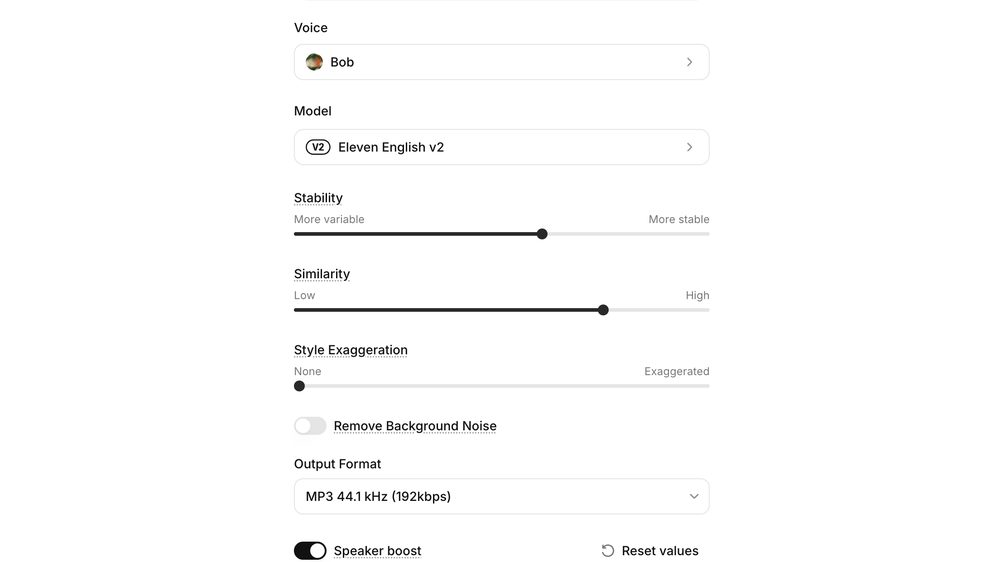
Voice Changer, configured for a cold delivery. ElevenLabs, Sept 2026.
VOICE CHANGER Voice your pre-made clone — same one every time, exactly like the ArtFlow actor Model Eleven English v2 Stability moderate-to-high Similarity HIGH — this is the important one Style Exaggeration NONE, for a straight-faced line Speaker boost ON Output MP3 44.1 kHz / 192 kbps Remove Background Noise OFF ← see below Raise Style Exaggeration only when the hero is genuinely excited, angry or upset. For a cold line — which is most of them in this format — more similar is better, every time.
Leave “Remove Background Noise” OFF. It sounds like exactly what you want and it is the wrong choice. You are feeding it the whole clip — the stein clinks, the room murmur, the sizzle — because that ambience is part of the scene and you didn’t isolate the voice on purpose. The model is smart enough to find and replace the voice while leaving the room alone. Switch that toggle on and you get a clean voice in a dead room, which sounds far worse than the problem you were trying to solve.

Making the clone in the first place

ElevenLabs clone types and their audio requirements
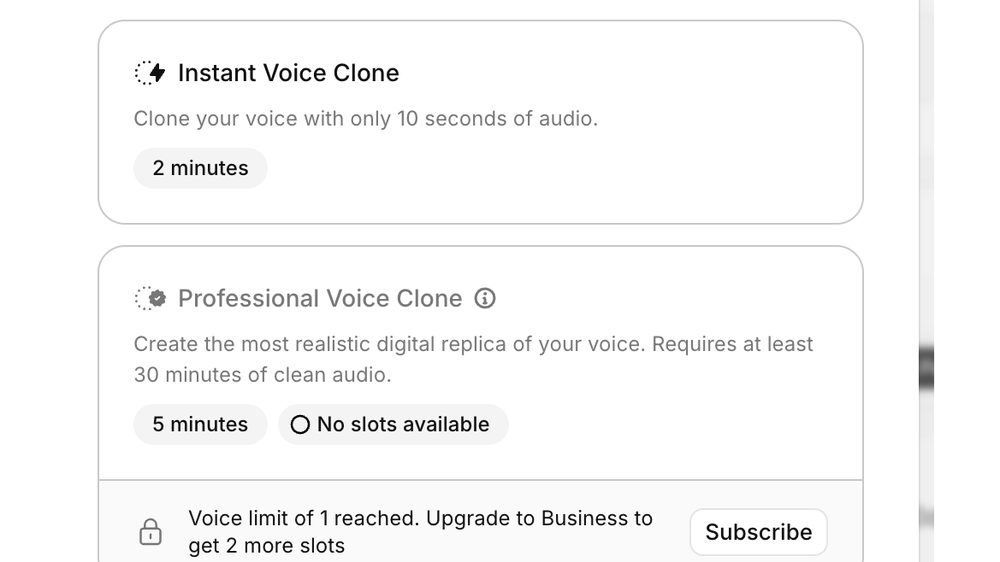
Two tiers, and the gap between them is the whole decision. ElevenLabs, Sept 2026.
  • Instant Voice Clone — ten seconds of audio, ready in about two minutes. Genuinely useful for testing whether an idea works before you ask anyone for anything.
  • Professional Voice Cloneat least thirty minutes of clean audio. This is what you want for a character you’ll use fifty-two times, and it’s the reason the recording session is worth doing properly.

Recording the source: quiet room, consistent mic distance, natural speech, more variety than you think you need — questions, statements, warmth, flatness. Don’t record someone performing an ad. Record someone talking.

What kills a clone: background hum, inconsistent mic distance, over-processed input, and a source recording where the person is trying to sound like a voiceover artist.

You will rarely make a clone twice. Built properly from a real thirty minutes, it just works — and on the rare occasions a voice pass needs redoing, the cause is almost always timing rather than the voice itself. Which sends you back to Chapter 8, not back to the microphone.
The permission conversation. A voice clone can say anything. That’s exactly why the person has to understand what they’re agreeing to, where it will be used, and that it won’t be used anywhere else. Put it in writing. Say so on camera.
12

Why Not Resemble

A tested negative. Same script, both engines, more than once — and it wasn't close.

No video

I ran the same script through both. More than once. ElevenLabs is the one that sounds like the actual person — and it wasn’t close.

That’s the finding, and this chapter is short on purpose. You don’t owe a reader your test footage. You owe them the result and the method.

But here is the part that complicates it

Your audience has never heard the actual person. They have no reference. Play them either version and they’ll accept it, because they have nothing to grade it against. If you judge these tools purely on what a stranger scrolling past can detect, the comparison barely matters.

So who is the difference for?

Your client. And everybody who has ever met them.

That is not a small group and it is not an incidental one — it is exactly the local audience this whole method is built to reach. The people most likely to hire this business are the people most likely to know what its owner sounds like. A near-miss is invisible to strangers and glaring to the neighbors. It is the same logic as the triage in Chapter 11, one layer down: the accuracy only matters where the familiarity exists, and that’s precisely where it matters most.

The transferable part isn’t about Resemble

HOW TO ACTUALLY COMPARE TWO TOOLS Same script. Same day. Same ears. Back to back. More than once. Then ask the only question that decides it: "Does a person who KNOWS this voice believe it?" — not "is it impressive?" — not "is it cheaper?" Most tool comparisons online never did any of this, which is why they all conclude that everything is great.
Run the test, publish the verdict, skip the bake-off. A side-by-side video invites the reader to referee a contest you already settled with better information than they have. Tell them what you ran, what won, and why — then get back to the work.
13

Assembly

By the time you're in Premiere the creative decisions are made. This is carpentry.

Video 6:45
“Halo sold separately, but free coffee in the lobby is included.” Assembled from the master copy: clip, voice pass, music, caption pops, end card.

By the time you’re in Premiere, the creative decisions are already made. This is carpentry, and speed comes entirely from having built the jigs in advance.

The first move, before anything else

The clip lands on the timeline. Before a single cut, a caption, or a logo — right-click the audio and open it in Adobe Audition.
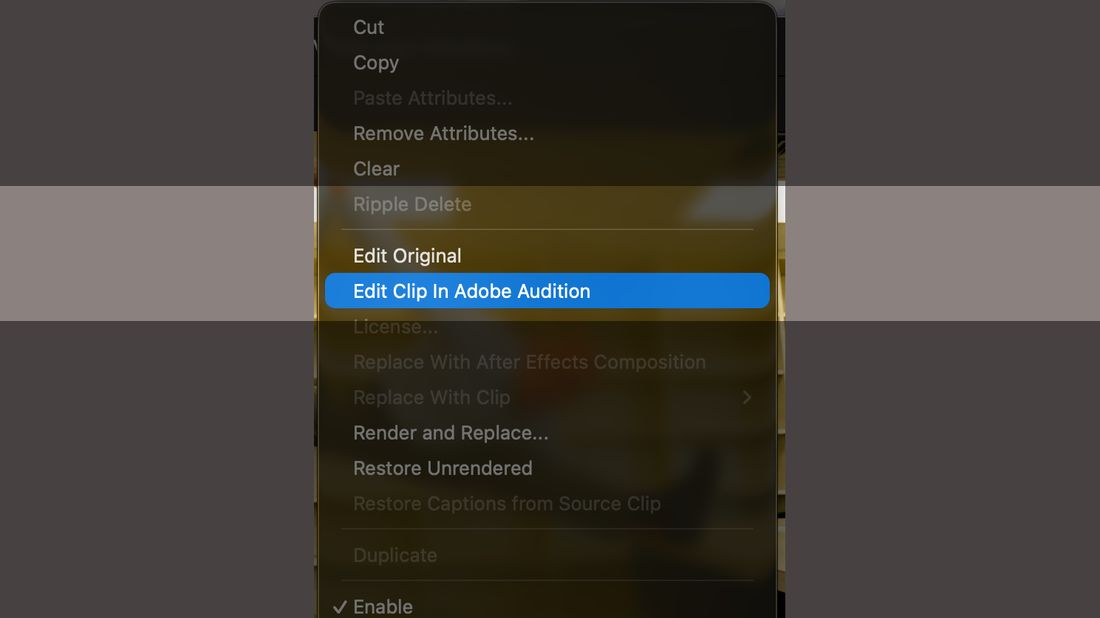
Premiere right-click menu with Edit Clip In Adobe Audition highlighted
Right-click the audio › Edit Clip In Adobe Audition. Not Edit Original, which sits three items above it and does something else entirely. Premiere Pro, Sept 2026.
Even when there is no dialogue. This is the part worth arguing about, so here’s the argument: generated audio comes back quiet whether it’s a spoken line or a sizzling pan, and the chain in Chapter 14 fixes both. More importantly, making it unconditional removes a decision. The moment the round trip becomes a judgment call — does this one need it? — you start skipping it on the clips you’re in a hurry with, which are exactly the clips that end up published.

Doing audio first also inverts the usual order, and deliberately. Most people cut picture and fix sound at the end. Here the clip is finished audio before you start layering anything on top of it, which means every later decision — where the music sits, where the caption lands, how long the end card runs — is made against what the reel will actually sound like.

The stack, in order

THE TIMELINE C1 Subtitles / captions V4 Caption pops (the .mogrt) V3 End card · logo sequence V2 Overlays as needed V1 The generated clip A1 Dialogue / clip audio ← this goes to Audition FIRST A2 Music bed Assemble in this order: audio round trip, then picture, then graphics, then the end card, then captions last.

The master copy

Don’t start a project. Open the one that already has everything in it.

Every reel begins by opening the same Premiere project and importing the new clips, audio and music into it. Nothing is set up from scratch, because the setup is the slow part and it never changes.

THREE TIERS MASTER MASTER COPY Pristine. Touched only when the master copy gets broken — and it will, eventually. MASTER COPY The working template. Open this one. Permanently contains: · the animated logo for each business · your own animated logo · the animated overlay / watermark that goes on every video · the .mogrt and transition presets WORKING COPY Save-as per reel. Import today's clip, voice pass and music into it. HOUSEKEEPING: delete the imported assets when the reel is done, or at the start of the next one. Two projects' worth of music beds and stray scenes and you're hunting through the bin instead of editing.
The master master copy is not paranoia. You will at some point save over the template with a finished reel’s worth of junk in it, or delete something you needed, and the cost of that is an evening rebuilding your logos and overlays. One pristine copy, never opened for work, makes that a thirty-second recovery.

Generating the captions — one word at a time

Single Word. Not single line, not double line.
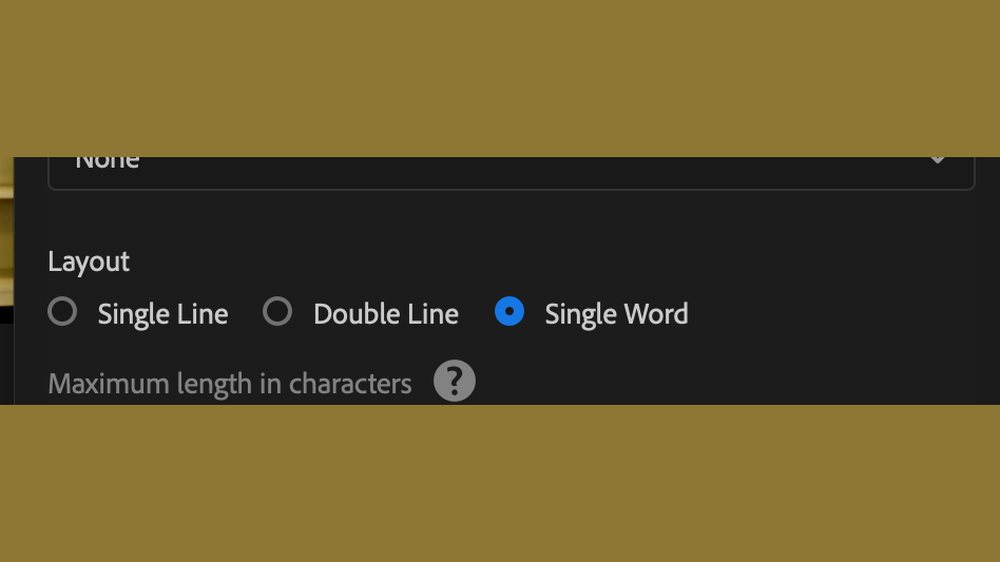
The Create Captions layout options with Single Word selected
Text › Transcript › Create Captions › Layout: Single Word. Max length, minimum duration and gap all gray out — they don’t apply. Premiere Pro, Sept 2026.

This is the decision the whole caption look hangs on, and it happens before any styling. Premiere transcribes the audio and can lay captions out three ways. Single Word puts exactly one word on screen at a time, which does three things at once:

  • It makes the pop possible. A pop on a five-word line is a wobble. A pop on one word is a beat — and every word gets its own.
  • It follows the delivery. Words land as they’re spoken, so the caption is doing the comic timing with the audio rather than lagging a phrase behind it.
  • It survives a muted phone. One large word is legible at a glance on a small screen in a way a two-line subtitle never is.

The caption style

Saved as a Track Style, so it applies to every caption in one move and never has to be rebuilt.
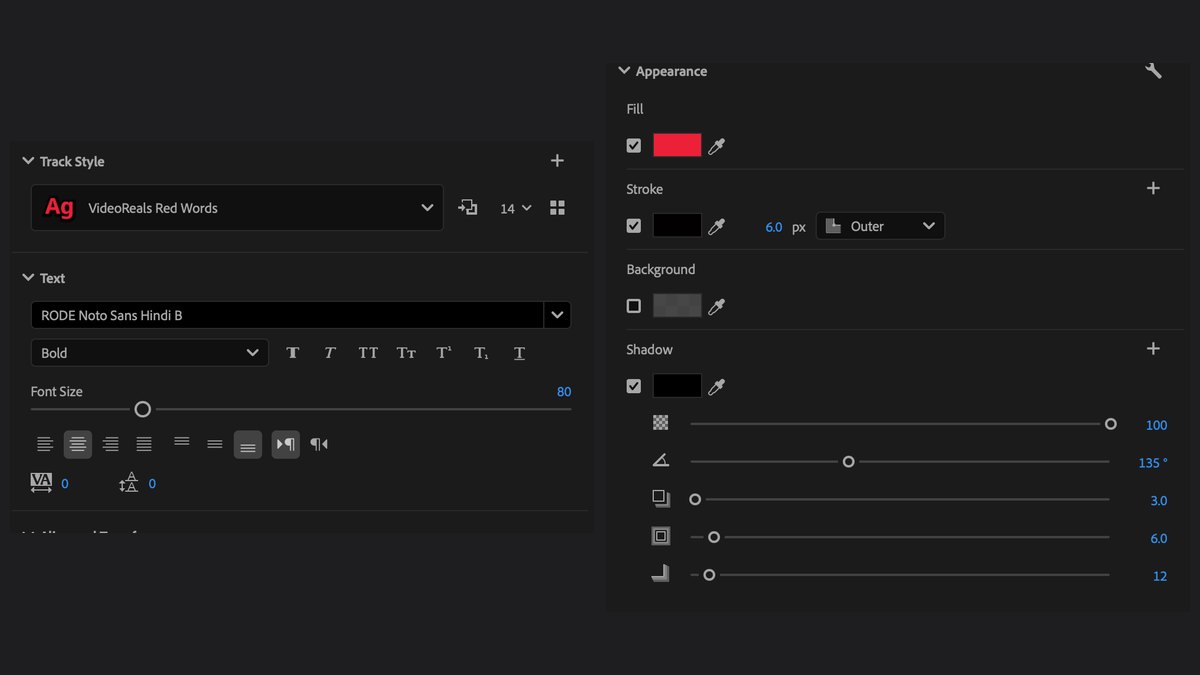
The caption track style properties
Track Style › VideoReals Red Words. Set it once, name it, and it’s a dropdown from then on. Premiere Pro, Sept 2026.
THE CAPTION STYLE Track Style saved and named — set once, applied from a dropdown Font RODE Noto Sans Hindi, BOLD Size 80 Align centered Zone bottom-center Offset 0, −115 ← lifts it off the bottom edge APPEARANCE — three layers, all three needed Fill red Stroke black · 6.0 px · OUTER Background OFF (no box) Shadow black · opacity 100 · angle 135° · distance 3.0 size 6.0 · blur 12
The three-layer stack is the whole trick, and the font matters less than you’d think. Red type on its own is unreadable over half the frames you’ll generate — a red shirt, a brick wall, a sunset. The 6px outer stroke is what separates it from anything behind it, and the drop shadow lifts it off the picture so it reads as an overlay rather than something painted on the wall. Swap the typeface for any heavy grotesque you like; keep the stack.
Why the −115 offset matters. The bottom of a vertical frame is where every platform puts its own furniture — usernames, progress bars, the “more” button, auto-captions. A caption sitting on the true bottom edge gets covered on at least one platform. Lifting it clear costs nothing and you never have to think about it again.
No background box. A solid caption box is the fastest way to look like default software output. The stroke does the legibility job the box was there for, without putting a rectangle over your picture.

The caption pop — every word, one paste

This is the signature move, and it is not a transition. There is no Cmd+D anywhere in it. It’s a two-keyframe scale animation living on Vector Motion, copied off one graphic and pasted onto all of them at once.
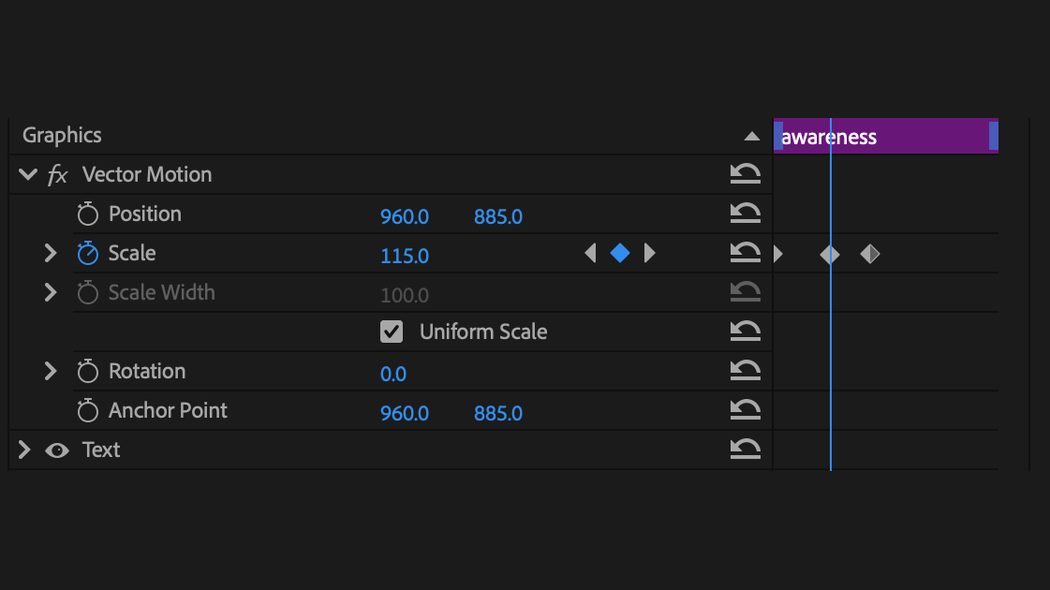
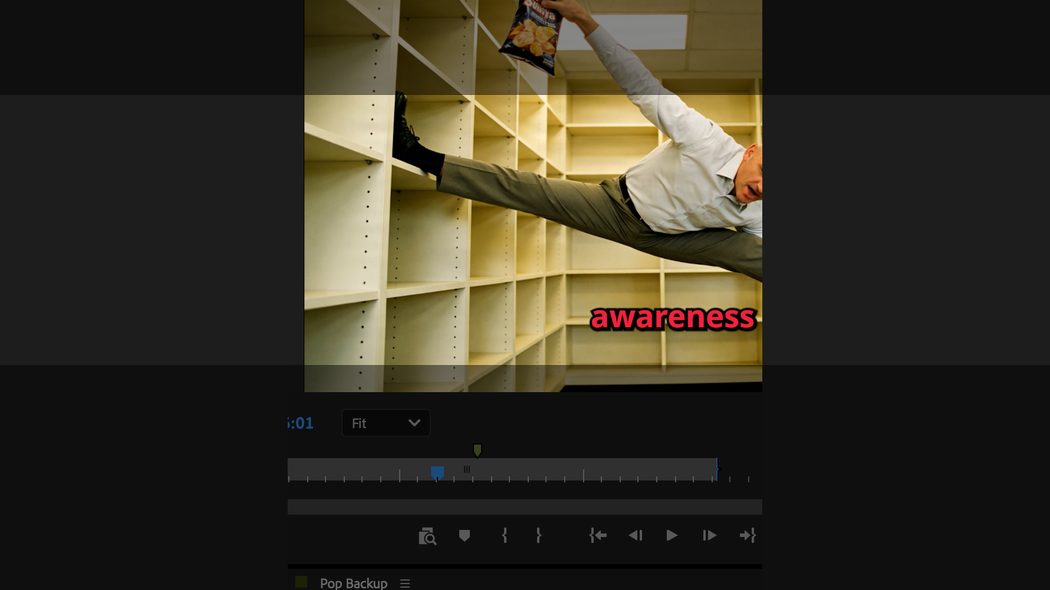
Effect Controls showing a Vector Motion scale keyframe at 115
The whole animation. Scale sits at 100, pops to 115, settles back to 100 — over a handful of frames. That’s it. Premiere Pro, Sept 2026.
Vector Motion, not Motion. They sit one above the other in Effect Controls and they are not the same thing. Vector Motion transforms the graphic inside the clip — the text itself. Motion transforms the clip in the frame. Paste the wrong one and you’ll move the whole layer around instead of popping the word.
THE CAPTION POP — the whole procedure BEFORE: convert the captions to GRAPHICS. Nothing below works on caption items. 1. Drag your saved pop template onto the timeline. Anywhere — past the end of the video is fine. It's a donor, not an edit. 2. Right-click it > COPY. 3. Highlight ALL the title graphics at once. 4. Option-Cmd-V (Paste Attributes — NOT plain paste) 5. In the dialog, check EXACTLY ONE box: ☑ Vector Motion ☐ Motion ☐ Opacity ☐ Time Remapping ☐ Unassigned Masks ☐ Effects ☐ every audio attribute 6. ☐ Scale Attribute Times — LEAVE THIS UNCHECKED. 7. OK. Every word now pops, identically.
The Paste Attributes dialog with only Vector Motion checked
One box. Paste Attributes is a scalpel — the default temptation is to leave things checked, and every extra box drags something you didn’t want across with it. Premiere Pro, Sept 2026.
Why “Scale Attribute Times” stays off, and it matters more than it looks. Checked, Premiere stretches the animation to fit each clip’s length — so a caption that sits on screen for two seconds gets a slow, lazy pop, and a one-word caption gets a snappy one. Unchecked, every word pops with exactly the same timing regardless of how long it’s up. That uniformity is the entire reason it reads as a designed effect rather than an accident.

Once the donor graphic is saved to Graphics Templates › My Templates › Local Templates, the whole thing is a drag, a copy, a select-all and one keystroke — on a reel with fifteen caption words. That is the hour-you-never-spend-again in its purest form.

Templates over technique
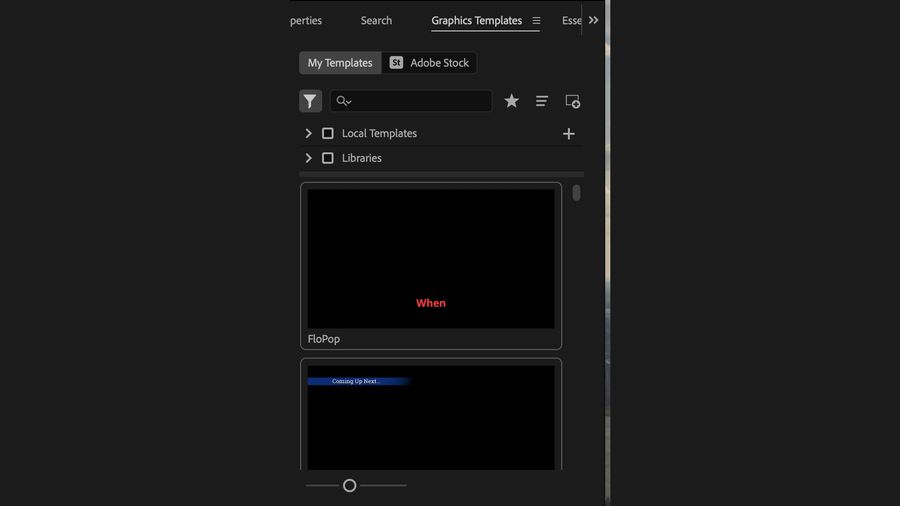
The Graphics Templates panel with local templates installed
Graphics Templates › My Templates › Local Templates. Motion graphics templates live here and drag onto the timeline like clips. Build once, use fifty-two times. Premiere Pro, Sept 2026.

A saved motion-graphics template and a saved transition preset turn a five-minute repetitive task into a drag. The single highest-leverage hour you will ever spend in Premiere is the hour you spend making things you’ll never have to build again.

Cut on the beat, not on the frame. The edit should feel like the music, even when the music is barely there.

The end card

The last frame belongs to the client, not to you.
An end card: the client's logo on white
Three to four seconds, maximum. The client’s logo, a slow slight push, the music fading under it. Premiere Pro, Sept 2026.
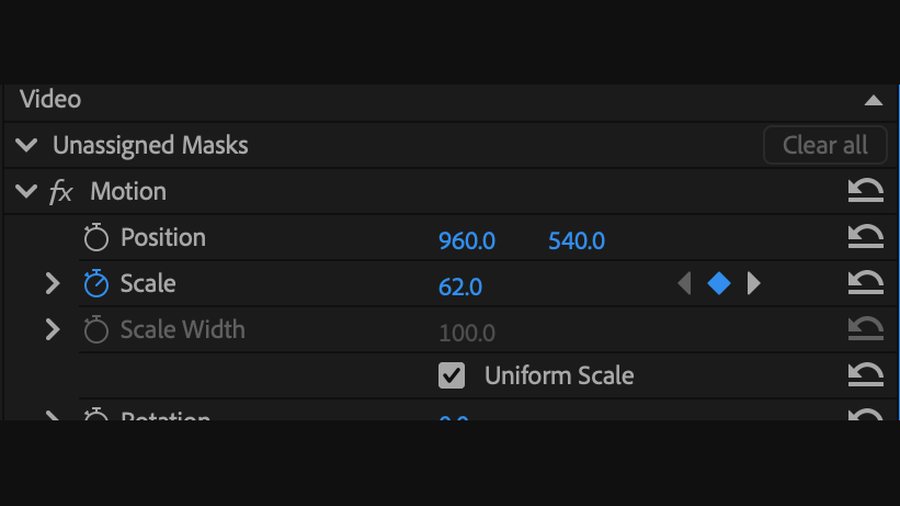
THE END CARD Content The client's logo. Nothing else. Not yours. Duration 3–4 seconds MAX Motion a slight slow zoom, eased — roughly 62 → 69 scale over the length of the card. About a 10% push. If a viewer notices the move, it's too much. Audio music fades out under it Last frame THE LOGO. Never black.
Motion scale keyframes on the end card logo
Scale keyframed on Motion here, not Vector Motion — this is a PNG on the timeline, not a text graphic. Premiere Pro, Sept 2026.

Why it ends on the logo and not on black

A fade to black says the thing is over. A logo held for three seconds after a laugh says something else entirely:

This is who made you smile today.

That is the whole job of the end card, and it’s why the timing matters. The card doesn’t arrive during the joke and it doesn’t arrive after the viewer has moved on. It lands in the two or three seconds while they are still enjoying it, and it attaches a name to the feeling.

It’s the client’s logo, not yours. You made the reel; they get the last frame. The producer’s credit belongs nowhere near the end of a piece of somebody else’s marketing — and a client who notices that you gave them the closing frame instead of taking it is a client who calls you again.

This does not contradict Chapter 6. Two different blacks, two different jobs. The generated clip ends on clean black — that’s a plate, raw material, room for a title. The finished reel ends on the logo. The black gets used up in assembly; it is never what the viewer sees last.
14

Audio Finishing and Shortcuts

Bad audio is the fastest way to look amateur and the easiest thing here to fix permanently. Four effects, one click, forever.

No video

Raw AI audio comes out too quiet to carry a joke. Don’t stop at “it plays.”

Bad audio is the fastest way to look amateur, and it’s the easiest thing in this entire pipeline to fix permanently. The same four steps, in the same order, on every single reel. Once you know the chain you never think about it again.

Where it lives
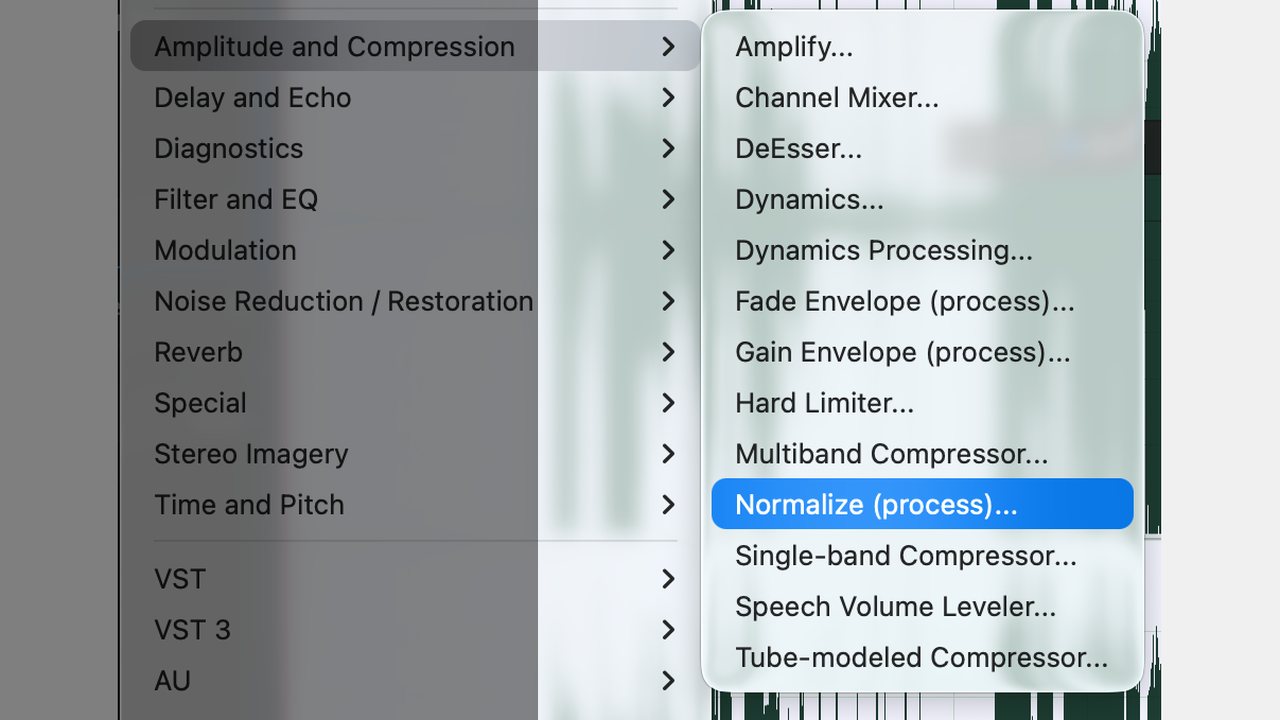
Adobe Audition Effects menu, Amplitude and Compression submenu, Normalize highlighted
Effects › Amplitude and Compression. Normalize and Multiband Compressor both live here, and you’ll be back and forth between them four times. Audition (beta), Sept 2026.

The chain

THE CHAIN — same order, every reel 1. Select the entire waveform 2. Effects > Amplitude and Compression > Normalize to 98.5% 3. Effects > Amplitude and Compression > Multiband Compressor preset: Indie Lo-Fi 4. Normalize once more final lift 98.5 — the late-night radio station. That's the mnemonic, and it's why the number sticks. Straight out of Kling, nothing comes before step 1. No noise reduction, no high-pass, no cleanup. The generator's audio is quiet, not dirty.
The one exception — ElevenLabs output. When you run a voice through ElevenLabs, it can come back mono. Convert it to stereo before you start the chain, or you’re processing half a file. Audition ships Convert Sample Type as a stock Favorite — it’s used often enough that Adobe put it there for you. Straight-from-Kling files don’t need it.
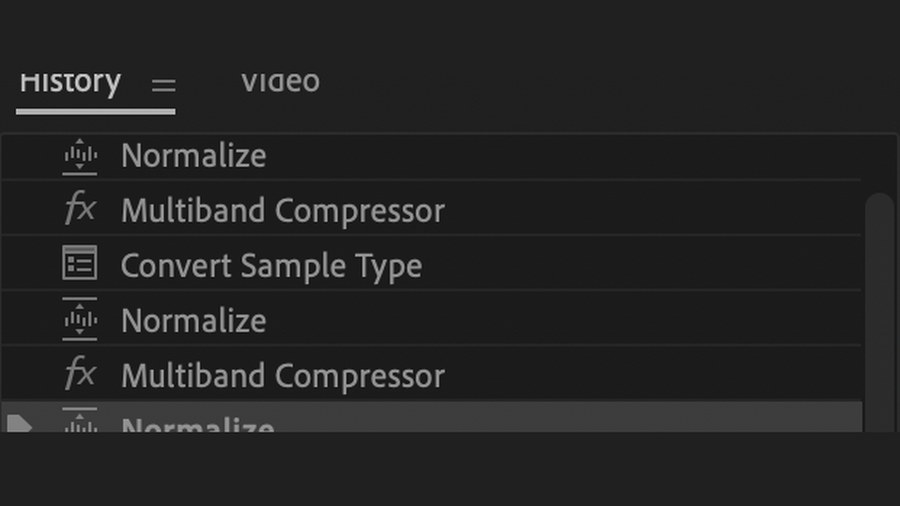
Audition History panel showing the processing order
The History panel is your receipt. On an ElevenLabs file the stack reads Normalize › Multiband › Convert Sample Type › Normalize › Multiband › Normalize. If your chain ever sounds wrong, this is where you find out which step didn’t take. Audition (beta), Sept 2026.

Indie Lo-Fi, in full

This preset ships with Audition, and on animated AI voices it does something no gentler setting does — it pulls the body of the voice forward without making it sound processed. If you can’t find it, or you’re on a version that names it differently, these are the values.
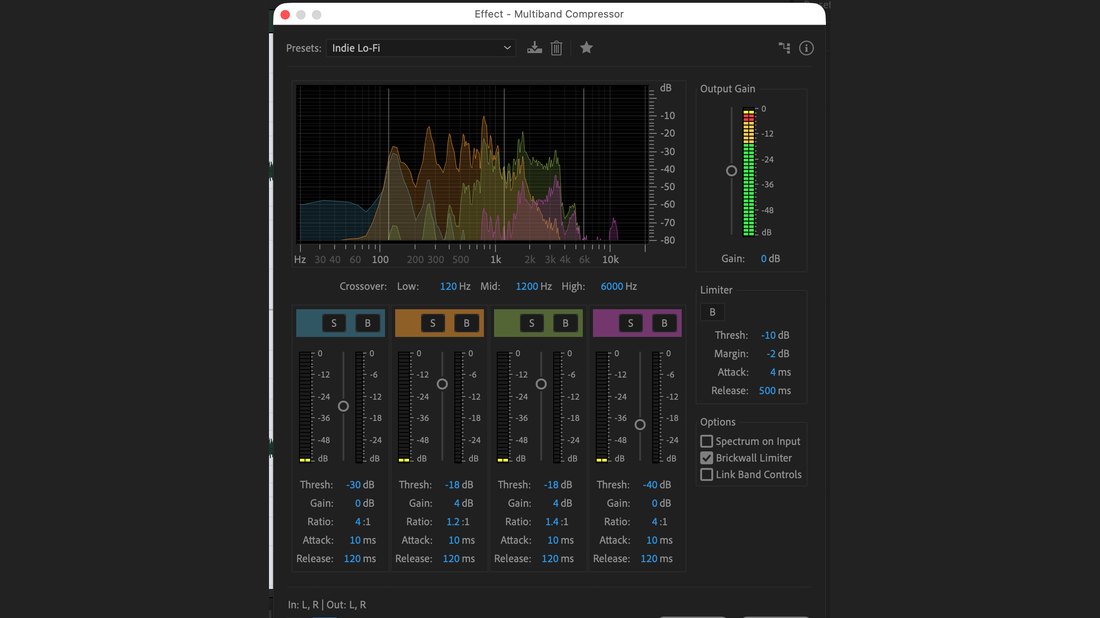
Multiband Compressor panel with the Indie Lo-Fi preset loaded
Indie Lo-Fi, loaded. Note the Brickwall Limiter is on and Link Band Controls is off. Audition (beta), Sept 2026.
MULTIBAND COMPRESSOR — "Indie Lo-Fi", dialled by hand Crossover Low 120 Hz · Mid 1200 Hz · High 6000 Hz Band 1 Band 2 Band 3 Band 4 Threshold -30 dB -18 dB -18 dB -40 dB Gain 0 dB 4 dB 4 dB 0 dB Ratio 4:1 1.2:1 1.4:1 4:1 Attack 10 ms 10 ms 10 ms 10 ms Release 120 ms 120 ms 120 ms 120 ms Output Gain 0 dB Limiter Threshold -10 dB Attack 4 ms Margin -2 dB Release 500 ms Options ☑ Brickwall Limiter ☐ Spectrum on Input ☐ Link Band Controls The two middle bands carry the voice — they get the +4 dB and the gentle ratios. The outer bands are held down hard at 4:1 to keep room noise and hiss from coming up with everything else.

Sometimes the sound effect is the joke
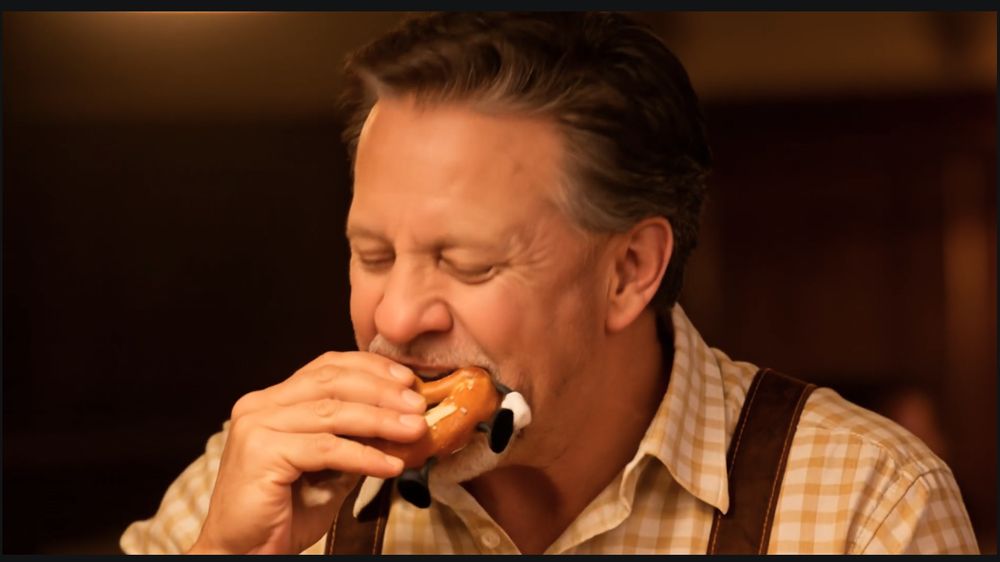
A close shot of the moment a sound effect carries the punchline
The whole reel is built to arrive here. Kling, Sept 2026.

A six-shot build, and the punchline is not a line at all — it’s a crunch. The audience has watched the hero take abuse from two talking pretzels for eight seconds, and the payoff they’ve been promised is the sound of one of them being eaten.

Raw out of the generator, that crunch is a low, murmured munch. The joke simply does not happen.

This is the strongest possible argument for running the chain unconditionally. There was no dialogue in that shot to protect — and it is the shot in the whole reel that most needed the boost. You cannot tell from looking at a clip whether its audio is load-bearing. Run the chain on all of it.

And when a sound effect is carrying the punchline, cut on it, not after it. Chapter 6.

Then never do it again

Audition lets you record a sequence of processing steps as a Favorite and apply the whole thing in one click. Mine is called Flo Boost, and it is exactly the four steps above — nothing is finished by hand afterward.

If you are running four effects by hand on every clip, you are spending an hour a week on something that should take four seconds. And for the days you build more than one reel, Batch Process runs your Favorite across a whole folder while you do something else. That’s the difference between one reel a day and three.
A note on microphones. Processing at the input stage is usually a mistake. Capture clean and raw, fix downstream where it’s reversible. Broadcast-style processing baked into the recording can’t be undone.
15

Validating Business Information

The unglamorous chapter that saves you. The most damaging mistake in local content isn't a bad joke.

No video

The most damaging mistake in local content isn't a bad joke. It's naming a business that closed.

Check every single time, even for a business you've named before

  • Is it still open? Local businesses close quietly.
  • Is the name spelled exactly right, including the punctuation they use?
  • Is the location right? Chains have multiple sites and you'll tag the wrong one.
  • Does the handle you're about to tag actually belong to them?
  • Have they changed ownership or name since you last posted?
Never invent a detail about a real business. Not their hours, not their specialty, not a menu item. If you're not certain, say something general or don't name them.
The reciprocity rule. If you're going to name a neighbor, tell them. A tag is a gift and it works far better when they know it's coming and can share it.

Never post a real person's misfortune, and in a business like bail bonds, never anything that could be read as referring to an actual case. When in doubt, the answer is no. There's another holiday tomorrow.

16

Publishing

One master, adapted per platform. And the first frame is your thumbnail whether you chose one or not.

Video 5:55
“We considered email. We chose aviation.” The post shouted out three real Albuquerque aviation institutions, each with a reason of its own.

Export once, adapt per platform. Same master, different crops, different first three seconds.

  • The first frame is the thumbnail on most platforms whether you choose one or not. Make sure frame one is a face, not a fade-up from black.
  • Caption everything. Most of your audience is watching muted. If the line only lands in the audio, it doesn’t land.
  • Post when your customers are on their phones, not when marketing blogs say to. For a bail bond office that is a very different clock than for a bakery.

The posting order — and why it starts where it does

Write for your most demanding audience first, then loosen. Never the reverse.

The order isn’t about reach. It’s an editing discipline, and it happens to also be the fastest route.

THE ORDER 1. LINKEDIN — compose here. The full version. Your most professional audience keeps you in check. 2. COPY IT BEFORE YOU CLICK SEND. Not the draft — the finished, edited version. 3. INSTAGRAM · X · FACEBOOK · TIKTOK Paste, condensed.

Composing in the most formal room forces the edit. By the time it reads properly for LinkedIn you have fixed the spelling, cut the fluff, and thrown out the one fact too many about Dog Day. That trimmed version is good everywhere.

Try it the other way and you’ll feel the difference immediately. Write loose for TikTok first and moving it to LinkedIn isn’t an edit, it’s a rewrite — you have to add the rigor you never applied. Loosening a tight draft takes a minute. Tightening a loose one takes the afternoon.

Copy it before you hit send, not before you edit. This sounds trivial and it is the difference between doing this once and doing it twice. Most people copy the draft, then keep improving it in the compose box, then publish — and every other platform gets the worse version, permanently. The moment the post is finally right is the moment to grab it.

Everything downstream is condensed from that one good version. Same joke, same tie-in, fewer words — and the hashtag block swapped per platform, per Chapter 17.

The post copy — eight parts, in order

The caption is not a description of the video. It is the video, continuing.

This is where most people throw away the work. They make something funny and then write “Happy Yoga Awareness Month! 🎧 Check out our video!” underneath it. The post copy is a second act, and it has a shape.

THE POST — eight parts 1. THE LINE, IN QUOTES. Open with the punchline from the video. Verbatim. 2. STAY IN CHARACTER — two or three sentences. Not commentary about the video. The same joke, continuing in prose, in the hero's voice. "I want to be clear that there was a step stool available. I want to be equally clear that I did not use it." 3. NAME THE OCCASION, and get one more joke out of it. "I've learned two things this week. One: I am significantly more flexible than I had any right to expect. Two: flexibility is only half of a plan." 4. THE LOCAL TIE-IN — and give it room. Don't name-drop. Hand the reader something genuinely interesting about a real neighbor, then DWELL on it. One verified, surprising fact beats three vague compliments. 5. THE PIVOT LINE. One short line that turns the tie-in back toward the tone. 6. THE CALL TO ACTION — that serves the community, not you. "Go find one. Tell them a guy at a Volkswagen store sent you." 7. SIGN IT AS THE CHARACTER. 🧘 – [hero] 8. TAGS. Local business first, then the hashtag block, then company pages. See Chapter 17.

Why part 4 is longer than it looks like it should be

The temptation is a sentence: “Shout out to the local yoga place.” That does nothing for anybody. What works is handing the reader a fact they didn’t know and letting it land:

— a local company makes a carbon fibre yoga mat, developed with a national lab. Sit with that. That lab is a Department of Energy national security site. Seventeen thousand people. And somewhere in that building, somebody looked at a yoga mat and thought, we can do better than foam.

The reader finishes that paragraph having learned something about where they live. That is the transaction. They came for a joke and left knowing a thing about their own town — and the business that gave it to them is the one they now associate with paying attention. Nobody screenshots a shout-out. People screenshot a fact.

A worked example

The Beer Day reel from Chapter 2, and the post that ran under it. Every part is doing its job:

THE LINE, IN QUOTES "I asked for complimentary pretzels, but these two haven't said a single nice thing about my lederhosen." – JL STAY IN CHARACTER "Well, I asked for complementary snacks, not Don Rickles wrapped in dough." ↑ note the spelling turn: complimentary → complementary. The joke is in a single letter and nobody explains it. NAME THE OCCASION Raise a glass — it's International Beer Day. Celebrated the first Friday of August: world-class brews, hard-working bartenders, and a well-deserved break. THE FACT BLOCK — three, verified, surprising · Founded 2007 in Santa Cruz; now marked in 80+ countries. · Germany's Weihenstephan is the oldest continuously operating brewery — brewing since 1040. · In ancient Mesopotamia brewing was largely women's work, because beer was a daily food staple. THE QUESTION — specific, with a fun answer "What is your absolute favorite local brew to unwind with on a Friday evening?" THE SHOUT-OUTS — four real ones, each with a reason Named, one line each, describing what's actually good about them. Not a list of names. TAGS #streetvw #InternationalBeerDay #AmarilloTX #PanhandleProud #CraftBeer #BeerDay #AI #videoreals → then the page tags, on their own line.
Look at the hashtag block against the slots. Occasion, city, regional identity (#PanhandleProud — a local tag that isn’t a place name and works harder than one), category, brand, and yours. Four of eight are geography or local identity. That’s the ratio from Chapter 17, in the wild.
And the shout-outs each carry a reason. “A southwest craft staple pouring fantastic local taps in a relaxed taproom” is a sentence somebody wrote. Four names with no reasons is a directory; four names with one line each is a recommendation, and it is the part the breweries themselves will share.

A third shape: let the audience write the caption

The twelve lines you didn’t pick are not waste. Sometimes they are the post.

Nine captions, no punchline chosen. The post asks the audience to vote by dropping a letter in the comments — or to beat all nine. National Dash Cam Day.

Chapter 3 told you to generate twelve lines and pick one, and said the rest become post copy and future posts. This is that rule taken all the way: publish the shortlist and make choosing the joke into the engagement.

THE CAPTION VOTE "Help us caption this video. Which line gets your vote?" A) ... B) ... ← seven to nine lines, lettered C) ... Range them: two obvious, several good, ... one weird. Variety is what makes voting I) ... feel like a decision. "Cast your vote by dropping the letter in the comments — or write a better one of your own." Then the occasion, the fact block, and the tags as usual.
Why this outperforms a question. “What do you think?” asks someone to compose a sentence in public, which is work. A letter is one keystroke — and once they’ve typed “C” they’re invested enough to argue with the person who typed “F.” You get a thread instead of a comment.
It only works if the lines are genuinely different. Nine variations of one joke reads as indecision. Nine postures — deadpan, panicked, bureaucratic, smug — reads as generosity. That is the posture rule from Chapter 3, cashed in a second time.

The other shape: the fact block

When the occasion doesn’t hand you one great local story, use three small ones instead. Your standing prompt already asks for this — exactly three, one line each, verified, and surprising.

THE FACT BLOCK — the alternative to part 4 FUN FACTS · [surprising, dated, checkable] · [surprising, dated, checkable] · [surprising, dated, checkable] Then ONE comment-bait question — a specific one with a fun answer, never "what do you think?" "What is the single nerdiest hobby you proudly enjoy?" Then the local shout-outs: three or four named institutions, not a category.
Every fact and every business gets verified before it goes out. A wrong date or a closed business in a post that also names four neighbors is worse than no post — you have made a public claim about people who live near you. Chapter 15 is the checklist.
17

Hashtags

Different jobs on different platforms. The local tag is the one that converts.

No video

Hashtags are not one tool. Using the same block everywhere is why they stop working.

  • Instagram — still functional for discovery. A modest, relevant set beats a wall of thirty.
  • TikTok — the caption and the content matter far more. A couple of relevant ones; the algorithm reads the video, not your list.
  • Facebook — nearly decorative for reach. One or two. Effort is better spent tagging the actual local business.
  • YouTube Shorts — a small number in the description. The title does the real work.
  • X / LinkedIn — one or two maximum on X. LinkedIn tolerates a few, and the professional-angle tag outperforms the holiday tag there.

The block, by slot

Six to eight tags, and every one has a job. Fill the slots rather than brainstorming.

THE HASHTAG BLOCK — six to eight, by slot 1. THE OCCASION #YogaAwarenessMonth 2. THE CITY #Albuquerque 3. THE CITY, SHORT #ABQ 4. NICHE + CITY #YogaABQ 5. CITY + NICHE #AlbuquerqueYoga ← yes, both orders 6. THE BRAND #UniversityVolkswagenMazda 7. THE CATEGORY #VW 8. (optional) YOURS #videoreals Slots 2–5 are FOUR local tags out of eight. That ratio is the whole strategy.
Both orders of the compound, deliberately. #YogaABQ and #AlbuquerqueYoga are different tags with different populations following them, and neither one is obviously the “right” one. Taking both costs you a slot and catches two audiences who would otherwise never see it.
The local tag is the one that converts. National occasion tags get you volume from strangers who will never buy. The local tag gets you three people who might — and that is why four of the eight slots are geography.

Tagging pages is a separate mechanic

On LinkedIn and Facebook especially, tagging a company page is not the same as a hashtag. A hashtag is a filing system. A page tag is a notification — it puts your post in front of a specific business’s account and gives them a one-click reason to share it.

PAGE TAGS — a separate line, after the hashtags · The local business you featured ← the whole point · Two or three other real local ones ← the shout-outs · The client's own page · The manufacturer / franchise pages, if relevant · Your own production company Hashtags file the post. Page tags deliver it to a human being who can share it.
Only tag pages you actually referenced. Tagging a business you didn’t mention to borrow their audience is the fastest way to get muted by exactly the local accounts you were trying to befriend.
$

What It Actually Costs

Not a price. A division problem — and the answer moves more with your volume than with anybody’s price list.

Calculator

The cost of a reel is not a price. It’s your monthly bill divided by the reels you actually made.

Every tool in this guide sells a monthly subscription. Not one of them sells reels. So the only number that means anything is the division — and that has two consequences most people never work out.

  • Your volume moves the number far more than any vendor’s pricing does. Doubling your output halves your cost per reel. A twenty percent price rise barely registers. The person making thirty reels a month pays a fraction of what the person making five pays — on an identical bill.
  • Unused capacity is money you already spent. Credits do not roll over. If your plan includes twenty-six thousand and you use twelve thousand, your real cost per reel is roughly double what the price list says. Nobody invoices you for that. It just quietly happens at renewal.
Which is why there are no dollar figures in this chapter. Prices change — someone will raise theirs, someone will undercut them, a tool in this guide will be replaced by one that doesn’t exist yet. The arithmetic doesn’t change. Put your own numbers in and it stays true.

The calculator

Two things it tells you: what a reel really costs, and whether you’re throwing away credits you already paid for.

per finished reel, all in

Credits you need each month
Credits your plan includes
Credits left on the table
Your effective cost per credit
Reels this plan could support

Defaults describe one real setup as of September 2026 — a large monthly video plan, a voice tool, a little hosting, and eleven-second 1080p generations. Replace every number with yours. Nothing here is fetched from a vendor, so it can’t go stale.

How to say it out loud

Once you have your number, the honest way to state it has three parts and takes ten seconds.

THE HONEST COST STATEMENT 1. THE DIVISION, not a price. "All my subscriptions divided by the reels I actually made comes to about $X each." 2. THE COMPARISON, so it means something. Against one boosted post. One stock clip license. One hour of a freelance editor. Never against zero. 3. THE PART THAT ISN'T MONEY. "That doesn't count my time. Mine is 30-40 minutes because I've done this for years. Yours will be a weekend at first, and then it won't be." Never quote a number you haven't divided yourself this month.
Don’t round it down to sound impressive. “Under a dollar” is a great line and it’s only true at volumes most people won’t reach. The credibility of every other number in this guide rests on this one being checkable — and a business owner who runs your math and finds it optimistic will not believe your settings either. Quote the number that survives being checked.

The comparison that actually lands

A cost per reel means nothing on its own. It means something next to the other things a small business buys in order to get seen:

  • One boosted social post, once
  • One licensed stock clip — of somebody else’s face, in somebody else’s office
  • One hour of a freelance editor
  • One month of almost any marketing subscription that produces nothing on its own

Against any of those, the number is the argument. And what you get for it has your face in it, your town in it, and a joke nobody else has made.

The expensive part was never the technology. It’s the forty minutes — and the years it took to get the forty minutes down from a weekend. That’s the honest headline, and it’s the one nobody selling a subscription will ever put on a pricing page.

The Reel Gallery

Finished work, with one line each on what it demonstrates. Every rule in this guide, in the wild.

Gallery

Every reel here was made by one person in under an hour, using nothing that isn’t in this guide.

Read the chapters for the method. Watch these for the proof — and for the thing chapters can’t show you, which is how much variety the same forty-minute process produces once the jigs are built.

World Lion Day — the absurd party as participant. A lion loose on the showroom floor, treated as an ordinary visitor who gets “full points for enthusiasm.” Squared to the room, not shown broadside. And the question turns the joke back on the business: which model has the most legroom for a lion?
Cycle to Work Day — the line does the whole job. “I said I’d cycle to work. I never said the bicycle had to touch the road.” Run the swap test on it: make the bicycle a car and the line dies instantly. That’s a line that passed.
Melon Day — the hero as the target. Self-deprecation is the safest comedy a business owner owns, because the only person it can hurt is the one who approved it. And the local fact is the best in any of these: Sandia is Spanish for watermelon — so the mountain range on the horizon is the shout-out.
International Beer Day — the occasion, the business, and the town in one frame. A horse at the bar, and the hero making sure he designates a driver. For a bail bond office that is not a random joke: it is the business’s actual subject matter, told sideways. The shout-outs went to a biergarten, a brewery and the town’s German festival.
International Cat Day — a pun that passes the test. “Mr. Claws and I have different ideas of what liquid assets are.” Liquid assets is a real term at a car dealership, seen through a cat. That is the whole rule from Chapter 3: a pun earns its place when it names something that actually happens at this business.
Lucille Ball’s birthday — borrow the trope, never the property. A conveyor belt and a man who cannot keep up. No character is depicted, no property is used, and everybody gets it instantly. The fact chain in the post is the best in the whole set: she bought out Desilu, became the first woman to run a major TV studio, and greenlit Star Trek.
The Melon Day fact is the whole of Chapter 16 in one line. Nobody screenshots a shout-out. A reader who finishes that post knowing why their own mountains are named after a melon has been given something — and the business that gave it to them is the one they now associate with paying attention.
What the gallery is quietly proving. Same face, same format, same forty minutes — a lion, a bicycle, a melon, a bear, a crab, two pretzels and a chicken. The variety is not in the tooling. It’s in the calendar. That is the argument for the whole method, and it can only be made by showing you a pile of them.

THE SHOOT SHEET

VideoReals · The Director's Guide · every setting, no prose · printed

1 · Pre-flight

  • Rank today's list (there are 5–15). 1) Can I name a real neighbor? 2) Can I see it — bonus for verbs? 3) Everything else, bottom.
  • Real event with real dead people in it → off the list entirely. Not a ranking call.
  • Local tie-in: one or two businesses, not ten · post FROM the location tag · tag them in the image · one verified fact. Never a chain.
  • Cultural occasion? Borrow the trope, never the property. Red shirt yes, Captain Kirk no.
  • Who it's for, in one sentence · what job it does, in one sentence
  • Titles list written first — 5–7 comic role titles from the business's own vocabulary
  • Twelve lines minimum, posture varied: deferential, exasperated, conspiratorial, resigned, over-formal, defeated
  • SWAP TEST — replace the absurd element with a normal one. The line must die.
  • OCCASION TEST — replace the holiday with a different one. The line must die.
  • DATE CHECK — is the occasion actually today?
  • Punchline lands on the last word
  • Pun? Only if it names something that actually happens at this business
  • Local business named? Verified open, spelling, location, handle, ownership
  • Aspect ratio set to 16:9 before generating

1b · The still

  • MOUTH CLOSED, LIPS TOGETHER, NO SMILE — every character, including the speaker. An open mouth in the still commits you to who talks before you've decided.
  • Eyeline written as its own sentence. Two subjects in a frame is not two subjects in a scene.
  • Absurd party squared to whoever addresses it — participant, not specimen
  • Eyes, mouth, body, hands specified with an endpoint. No mood adjectives.
  • No text on any surface — signage, glass, screens, reflections, through windows
  • No logos anywhere. Walls blank. Real logos composited in post.
  • Never assert what the actor supplies — age, build, hair, features. Wardrobe and posture only.
  • Photoreal. Never the phrase "New Yorker style."

2 · Character discipline

  • Exactly one named subject per prompt
  • Everyone else referred to generically — "the woman", "a man in an apron"
  • Character reference first in the prompt, then scene, then light
  • Don't re-describe the face. Name the character, describe the action, stop.
  • Waist-up medium shot · footwear excluded · logo background, not billboard

2b · Timing

0.0 — 1.2   Hold. Establish.
1.2 — 2.8   Buildup. One deliberate action.
2.8 — 4.4   Absorb. Settle. Commit.
4.4         CUT (if there is one). Hard, no transition.
4.4 — 6.0   Reveal.
6.0 — 8.0   Hold.
8.0 — 9.5   The line.
9.5 — 11.0  SILENCE — the laugh. DO NOT CUT HERE.

10–11s working range · 12s ceiling · 15s is Kling's limit, not yours
Say WHY a beat exists, not just what moves.
Number of Outputs: 1. Always. Reroll on a corrected prompt.

GOLDEN PROMPT — "Put on your comedic timing expertise and apply
it to this scene. Here is the image. Here is the line. Give me
the beats with timestamps."

THE BUTTON — the reaction after the line IS the punchline.
Cut to black on the reaction, never on the line.
Pun is the jab. The deadpan is the knockout.

2c · Which door

  • Line-first — the occasion hands you a phrase. Write it, then build the frame that lets it land.
  • Image-first — the occasion hands you a picture that's already funny. The line is icing.
  • The scan told you which. Notice what arrived — words, or a picture.
  • Fleshing-out pass: bring a rough idea, not a blank. End with "or if you have something funnier, don't hold back."
  • "New Yorker one-panel" is fine when talking to the writing AI. It must never reach an image prompt — say "realistic cinematic" there.

2d · Image prompt — the eight parts

1. @actor token — first, always
2. Format      "Photorealistic cinematic still, 35mm, 50mm lens, f/2.0"
3. Place+time  where, and what hour it is
4. Light       direction, quality, what it catches
5. Subjects    position · wardrobe · hands WITH AN ENDPOINT ·
               eyeline as its own statement · posture as intent
               ("she has been watching for a while")
6. Background  named objects, never adjectives
7. Camera      height, level, depth of field
8. Grade + negatives

STANDING NEGATIVES
No text, letters, numbers, signage, insignia, or writing anywhere.
No captions. No logos. No illustration or painterly style.

SET 16:9 BEFORE GENERATING. The default is often 3:2 — that's a
Photoshop generative-expand pass every single time you forget.

Reference names (Rockwell, New Yorker) are for the CONVERSATION.
Strip them before the prompt reaches a generator.

3 · Animation prompt

1. PRESERVE BY NAME — list the things. "Do not change the faces,
   the clothing, the dog's markings or vest, the truck, the house,
   or the lighting." A list beats "don't change anything."

2. CAMERA — "Locked off. No pan, no tilt, no zoom, no push.
   Static tripod shot."

3. SPEAKING CHARACTER — action, delivery, line verbatim in quotes,
   and what the hands/body do throughout.

4. SILENT CHARACTER — explicitly STILL. "Hands stay resting on the
   desk." "Chest still." "No other motion."
   Stillness has to be authored or it drifts.

5. MICRO-ACTIONS ANCHORED TO WORDS, not seconds:
   "His ears twitch once on the word 'treat.'"

6. AMBIENT, named separately — two clauses. Breeze in the grass,
   fabric movement, steam, distant branches. Without it a locked-off
   shot reads as a photo with a talking head pasted on.

7. Shot 2: "Clean cut to ..." — this is where the button lives.

Dialogue:      verbatim, in quotes, even if replacing the audio
Native audio:  OFF when an ElevenLabs pass is coming
Reroll:        a reroll is a SPECIFICATION failure. Fix the prompt,
               change one variable, never re-run the same text.

4 · Upscale — Krea / Topaz

SettingValue
Sharpness6%
Denoise15%
ModelStandard V2
Scale
Face enhancementOFF — the most damaging default in the chain

Don't upscale a structural failure. No upscaler fixes a morphed hand — it gives you a sharper morphed hand.

NEVER before the animation pass. An upscaled still is often too large for the video generator to accept, and grain added beforehand gets amplified into noise. Both are finishing moves. Between the still and the animator, the only legitimate edit is removing a genuine artifact and fixing the aspect ratio — then Quick Export as PNG.

4b · Credit discipline

  • Credits do not roll over. Whatever you don't spend by renewal is gone. Check the balance before the renewal date, not after.
  • Annual billing on a plan you already use daily is free money. Compare the yearly price against 12× the monthly one.
  • Change one variable per reroll. Changing three and getting a better result teaches you nothing.
  • Get the composition right in the still before you animate. Stills cost an order of magnitude less than motion.

4a · Captions

GENERATE: Text > Transcript > Create Captions
          Layout: SINGLE WORD  (not single/double line)
          One word at a time is what makes the pop a beat
          instead of a wobble.

STYLE (save as a named Track Style — set once, then a dropdown)
  Font      RODE Noto Sans Hindi, BOLD · size 80 · centered
  Zone      bottom-center · offset 0, −115
            (lifts it clear of platform UI furniture)
  Fill      red
  Stroke    black · 6.0 px · OUTER      ← does the legibility work
  Background  OFF — no box
  Shadow    black · opacity 100 · angle 135° · distance 3.0
                    size 6.0 · blur 12

The three-layer stack (fill + outer stroke + shadow) is the trick.
Red alone is unreadable over half your frames. Swap the typeface
if you like; keep the stack.

THE POP: not a transition. No Cmd+D. It's a Vector Motion keyframe.

BEFORE: convert captions to GRAPHICS.

1. Drag the pop template anywhere on the timeline (a donor)
2. Right-click > Copy
3. Highlight ALL title graphics
4. Option-Cmd-V  (Paste Attributes)
5. Check EXACTLY ONE box:  ☑ Vector Motion
     — NOT Motion. Vector Motion moves the text inside the clip;
       Motion moves the clip in the frame.
6. ☐ Scale Attribute Times — LEAVE UNCHECKED, or the pop stretches
     to each clip's length and every word times differently
7. OK

Animation: Scale 100 → 115 → 100 over a few frames.

4a2 · The end card

Content     the CLIENT's logo. Nothing else. Not yours.
Duration    3–4 seconds max
Motion      slight slow eased zoom, ~62 → 69 scale (a 10% push).
            If the viewer notices the move, it's too much.
            Keyframe on MOTION here (it's a PNG, not a graphic).
Audio       music fades out under it
Last frame  THE LOGO — never black.

"This is who made you smile today." The card lands while they're
still enjoying it and attaches a name to the feeling.

NOT a contradiction of §2b: the generated CLIP ends on clean black
(a plate for the title). The finished REEL ends on the logo.

4b · The master copy

MASTER MASTER COPY   pristine, never opened for work
MASTER COPY          the template you open every time — holds the
                     animated logos, the overlay/watermark, the
                     .mogrt and transition presets
WORKING COPY         save-as per reel; import today's assets

Delete imported assets when the reel is done, or at the start of
the next one. Two projects' worth and you're hunting the bin.

4c · Assembly order

1. Clip lands on timeline
2. RIGHT-CLICK AUDIO > Edit Clip In Adobe Audition
   — even when there is no dialogue. Unconditional.
   Not "Edit Original" (different command, three items up).
3. Run the chain (§5). File > Save. Premiere updates live.
4. THEN picture, graphics, end card, captions last.

Audio first is deliberate: every later decision gets made
against what the reel will actually sound like.

TIMELINE
  C1  Subtitles      V4  Caption pops (.mogrt)
  V3  End card       V2  Overlays
  V1  Generated clip
  A1  Clip audio  ← goes to Audition first
  A2  Music bed

4d · Voice pass

TRIAGE FIRST
  Hero speaking?    → Voice Changer. Always.
  Animal / object?  → ship the generator's voice, boost, move on.
                      Nobody has a reference for a talking potato.
  Hero but silent?  → nothing to do.

SPEECH-TO-SPEECH, not text-to-speech. You never type the line.

1. Generator makes the clip WITH its audio (timing already right)
2. Audition chain FIRST
3. Upload the boosted audio to Voice Changer
4. Out comes the same performance in your hero's voice

Voice                your pre-made clone
Model                Eleven English v2
Similarity           HIGH  ← the important one
Style Exaggeration   NONE for a cold line; raise only for
                     genuine excitement/anger
Speaker boost        ON
Output               MP3 44.1 kHz / 192 kbps
Remove Background Noise   OFF — the room ambience is wanted;
                     it finds the voice and leaves the room alone

Clone tiers: Instant = 10 sec. Professional = 30+ min clean audio.
Use Professional for anyone you'll shoot 52 times.

5 · Audition chain

1. Select entire waveform
2. Normalize                                     98.5%
3. Multiband Compressor                    Indie Lo-Fi
4. Normalize again                          final lift
→ Save as Favorite ("Flo Boost"). One click from now on.
→ SOMETIMES THE SOUND EFFECT IS THE JOKE. You cannot tell by
  looking which clip's audio is load-bearing. Run it on all of them.
→ Multi-reel days: Batch Process across the folder.

Straight from Kling: nothing before step 1.
From ElevenLabs: Convert Sample Type to stereo FIRST — its
output can be mono, and half a file processes like half a file.

Indie Lo-Fi by hand — crossover 120 / 1200 / 6000 Hz. Thresholds -30 / -18 / -18 / -40 dB · gain 0 / +4 / +4 / 0 dB · ratios 4:1 / 1.2:1 / 1.4:1 / 4:1 · attack 10 ms and release 120 ms on all four. Output gain 0 dB. Limiter -10 dB threshold, -2 dB margin, 4 ms attack, 500 ms release. Brickwall Limiter ON, Link Band Controls OFF.

6 · The cost sheet

LinePer reelNote
Video generation[FLO]credits × your plan's cost-per-credit
Stills[FLO]
Voice[FLO]~1 sec of speech per 15 characters
Hosting≈ $0.001Bunny Stream, 26 videos / 3 GB
Time30–40 minafter 45 years of reps. Your first is a weekend.

7 · The post

ORDER
  1. LINKEDIN — compose here, full version. The most professional
     audience keeps the writing in check.
  2. COPY IT BEFORE YOU CLICK SEND — the edited version, not the draft.
  3. Instagram · X · Facebook · TikTok — paste, condensed.

  Loosening a tight draft takes a minute.
  Tightening a loose one takes the afternoon.

STRUCTURE
1. THE LINE, IN QUOTES — the punchline, verbatim
2. STAY IN CHARACTER — 2–3 sentences, the joke continuing in prose
3. NAME THE OCCASION — and get one more joke out of it
4. THE LOCAL TIE-IN — one verified, surprising fact, and DWELL on it
   (nobody screenshots a shout-out; people screenshot a fact)
   — or, the FACT BLOCK: exactly 3 one-line verified facts
5. THE PIVOT LINE
6. CTA THAT SERVES THE COMMUNITY, not you
7. SIGN IT AS THE CHARACTER
8. TAGS

One comment-bait question — specific, with a fun answer.
Never "what do you think?"

HASHTAGS — 6–8, by slot:
  occasion · city · city-short · niche+city · city+niche
  · brand · category · (yours)
  Four of eight are geography. That ratio is the strategy.
  Take BOTH orders of the compound — different populations.

PAGE TAGS are a separate mechanic and a separate line.
  Hashtags file the post. Page tags notify a human who can share it.
  Only tag pages you actually referenced.
The teaching is in the videos. The settings are on the paper.
The full guide, with every chapter's video: guide.videoreals.com · VideoReals